Why Are My Google Reviews Not Showing Up? (Causes + Fixes)
April 17, 2026
 Rebecca Stone· Online Reputation Consultant
You asked a customer for a review, they left one, and now it's nowhere to be found. Frustrating, especially when you're counting on that review to build trust and rank higher in local search.
Here's the short answer: Google reviews don't show up because of spam filters, policy violations, processing delays, or reviewer account issues. Most missing reviews fall into one of these four buckets, and most can be fixed once you know what triggered the hide.
I've debugged this issue hundreds of times for local businesses. Below is the diagnostic playbook I actually use, plus the fixes that work.
Quick Fix Checklist (Start Here)
Before reading the full breakdown, run through this fast:
-
Wait 48 hours. Most "missing" reviews are simply processing.
-
Check in incognito mode. You might be seeing a shadow-filtered review.
-
Scan for links, phone numbers, or competitor names. These are auto-flagged.
-
Ask the reviewer to log into the correct Google account. Work emails sometimes lack review permissions.
-
Confirm the reviewer didn't use a VPN. IP mismatches trigger spam flags.
If none of those apply, keep reading. One of the seven reasons below is almost certainly the cause.
Why Are My Google Reviews Not Showing Up?
Google reviews go missing for four core reasons: algorithmic filtering, policy violations, publishing delays, and reviewer account problems. Google's system scores every review against spam signals before publishing it. If the score fails, the review is hidden, delayed, or permanently removed, usually without notifying you or the customer.
Google doesn't publish reviews in real time the way Facebook does. Each review passes through an automated moderation layer that checks the reviewer's history, content, IP location, posting patterns, and whether the business profile itself looks legitimate. A single weak signal can filter a real, honest review out of public view.
Here's where most businesses get it wrong: they assume a missing review is a bug. It's not. It's a decision the algorithm made, and the fix depends on which signal failed.
14 Common Reasons Google Reviews Are Missing
1. The Reviewer's Account Is Too New
Google weighs reviewer account age and activity heavily. New accounts get filtered far more aggressively than established ones.
Why Google flags it: An account created the same day as the review, with no profile photo and no prior activity, looks like a fake account set up to game the system.
How to confirm: Click the reviewer's profile or ask them directly. If they made a Google account just to leave your review, this is almost certainly the cause.
How to fix: Suggest they add a profile photo, leave one or two reviews for other places they've visited, then post yours a few days later. Trust needs a baseline.
2. The Review Was Left on a Third-Party Site
Reviews posted on Yelp, Facebook, Trustpilot, or industry-specific platforms don't appear on your Google Business Profile. This sounds obvious, but it's one of the most common reasons business owners think reviews are "missing."
Why it happens: Each review platform is a closed ecosystem. Google only displays reviews submitted directly through Google Search or Google Maps. A glowing five-star review on Yelp has zero impact on your Google profile, no matter how prominent the customer or detailed the review.
How to confirm: Ask the customer which platform they used. If they left the review on Yelp, Facebook, TripAdvisor, BBB, or any other site, that's why it's not on Google.
How to fix: Send a direct Google review link to the customer and ask them to post there as well. Generate your short link inside Google Business Profile under the "Ask for reviews" section, or use the format g.page/r/[your-ID]/review. Never copy-paste a review from another site into Google on the customer's behalf, that's a policy violation and gets both the review and your profile flagged.
3. Google's Spam Filter Removed the Review
Google runs every review through a machine learning spam filter before publishing. The filter scores reviews against patterns it has learned from billions of fake and legitimate reviews.
Why Google flags it: Reviews that match known spam patterns get filtered automatically. Common triggers include reviews that look templated, reviews from accounts tied to previous spam activity, and reviews that arrive during unusual posting spikes.
How to confirm: Check if the review was posted during a window when multiple reviews came in at once, or if the reviewer has flagged activity elsewhere.
How to fix: Ask the customer to rewrite the review in their own words with specific details about their experience, then resubmit after a few days.
4. Too Many Reviews Posted in a Short Window
Review velocity is one of Google's strongest spam signals. A sudden spike looks like coordinated fake activity, even when the reviews are genuine.
Why Google flags it: If five reviews come in within ten minutes from a business that usually gets one a week, the algorithm assumes manipulation. Event-based review drives, conference giveaways, and aggressive SMS campaigns often trigger this.
How to confirm: Look at the timestamps of recent reviews. Batches posted minutes apart are almost always the problem.
How to fix: Space out review requests. Aim for 2 to 5 per week for small businesses, never more than 1 or 2 per day. If a batch was already filtered, wait 10 to 14 days before asking those customers to post again.
This is exactly why many businesses switch to a system that helps them manage their review pipeline and avoid unnatural spikes that trigger Google’s filters.
5. The Review Contains Links or Contact Info
Google's content filter removes reviews with URLs, phone numbers, or email addresses. This rule applies even to positive reviews.
Why Google flags it: Links and contact info are the most common pattern in promotional spam reviews. The filter catches them instantly.
How to confirm: Ask the reviewer to send you the exact text they submitted. Scan for any URL, phone number, or email.
How to fix: Have them edit the review and remove the flagged element. Edits retrigger moderation, and clean versions usually publish within 24 hours.
6. The Review Violates Content Policy
Beyond links, Google removes reviews containing profanity, hate speech, personal attacks, confidential information, or content unrelated to the customer experience.
Why Google flags it: Google's review content policy prohibits off-topic content, offensive language, impersonation, and personal details like full names of employees.
How to confirm: Read the review carefully for anything that could be flagged as hostile, off-topic, or personally identifying.
How to fix: Ask the reviewer to edit the review and focus strictly on their experience with your product or service.
7. The Review Reads Like an Advertisement
Google filters reviews that sound promotional, even when the reviewer has good intent.
Why Google flags it: Phrases like "best in town," "call now," "don't miss out," or multiple superlatives in a row match the pattern of fake promotional reviews. Business owners writing review "suggestions" for customers is a common cause.
How to confirm: If the review reads more like marketing copy than a personal experience, that's the issue.
How to fix: Never write or script reviews for customers. Ask them to describe what they bought, who helped them, and what problem got solved. Specific beats promotional every time.
8. The Review Is Still Processing
Not every missing review is actually filtered. Google's publishing pipeline takes time.
Why it happens: New reviews get queued for moderation. Reviews from new accounts, unusual locations, or sensitive categories (medical, legal, financial) take longer to clear.
How to confirm: Check the submission timestamp. If it's under 48 hours old, you're likely looking at a delay, not a filter.
How to fix: Wait. Most reviews appear within minutes, but some take 24 to 72 hours. Don't contact support or ask for a repost inside that window.
9. The Reviewer Has No Review History
Even older Google accounts get filtered if they've never left a review before.
Why Google flags it: Zero-history accounts are the most common source of paid fake reviews. The filter treats them as high-risk by default.
How to confirm: Check the reviewer's profile for other contributions. If yours is their first and only review, expect filtering.
How to fix: Encourage reviewers to use their primary Google account (the one tied to Gmail and Maps) rather than a secondary or work account that's never been used for reviews.
10. The Reviewer Used a VPN
VPNs hide the reviewer's real IP, which creates a mismatch between their location and the business location.
Why Google flags it: A review for a Chicago dentist posted from a Romanian IP looks suspicious. The filter doesn't know the customer is a legitimate local using a VPN for privacy.
How to confirm: Ask the reviewer if they had a VPN, privacy browser, or corporate network active when they posted.
How to fix: Have them disable the VPN, switch to regular Wi-Fi or mobile data, and post again.
11. Location or IP Mismatch
Even without a VPN, location mismatches trigger filtering. This affects remote customers, travelers, and reviews posted long after the visit.
Why Google flags it: Google expects reviews to come from geographic areas that make sense for the business. A review from 5,000 miles away looks off, even when the customer is real.
How to confirm: Ask where the reviewer was physically located when they posted.
How to fix: Ask the customer to post while they're in the area if possible, or accept that some remote reviews will be filtered permanently. For online or service businesses, build reviewer trust through account history instead.
12. Reviews Posted from the Same Network
If multiple reviews come from the same IP address (for example, employees, family members, or customers on the same office Wi-Fi), Google flags them as related.
Why Google flags it: Shared IPs are a strong fake-review signal. The filter assumes coordinated posting.
How to confirm: Ask whether reviewers posted from your business Wi-Fi, a shared office network, or the same home.
How to fix: Never ask employees or their families to leave reviews. Have customers post from their personal mobile data or home networks.
13. Business Profile Issues
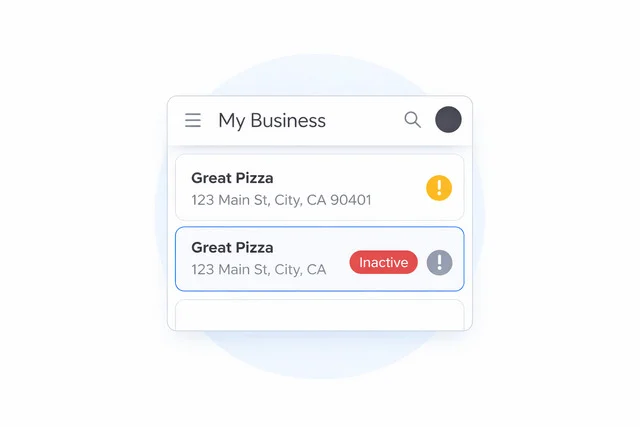
Sometimes the problem isn't the review, it's the profile receiving it.
Why it happens: Unverified listings, suspended profiles, duplicate listings, and recent profile edits (name, category, address) can cause new reviews to fail silently. Reviews also migrate when Google merges duplicate listings.
How to confirm: Sign into Google Business Profile. Check for verification status, suspension notices, and duplicate listings. Search your business on Google Maps and see if multiple pins appear.
How to fix: Verify the listing, resolve suspensions, and merge duplicates through the support dashboard. Reviews won't display correctly until the profile itself is healthy.
Read more: How to Search Google Reviews by Name
14. Google Removed the Review Permanently
Some filtered reviews aren't coming back. Once Google classifies a review as a clear policy or fraud violation, the removal is permanent.
Why it happens: Repeated policy violations, confirmed fake activity, or multiple user reports can trigger permanent removal. Accounts flagged for spam lose all their historical reviews retroactively.
How to confirm: If the review was visible, disappeared, and hasn't returned after 7 to 10 days, it was permanently removed.
How to fix: Ask the customer to write a brand-new review from scratch, not a copy of the original. Rewritten content sometimes passes the filter even when the original didn't.
Want me to update the full article with this expanded section and adjust other parts to keep the word count inside the 1900 to 2200 range?
Universal Fixes That Recover Most Missing Reviews
Here's what actually works when you need to recover missing reviews.
-
Ask the Reviewer to Edit the Review
Editing a review pushes it back through moderation. If the original was borderline, a small rewrite can clear the filter.
Ask them to change a few words, expand a sentence, or add a specific detail about their experience. Don't have them delete and repost, that often triggers harder filtering. Edit, don't recreate. -
Remove Links or Suspicious Content
If the review contains a URL, phone number, email, or anything that reads like promotion, edit it out. Google's content filter catches these instantly.
Also scrub unrelated content. A review that talks about a different business, a political opinion, or personal drama gets flagged as off-topic. -
Check Review Visibility (Incognito Trick)
Open an incognito or private browser window and search your business. If you see reviews there that weren't visible in your regular browser, you were logged into an account affecting personalized results.
If the review is still missing in incognito, it's filtered. If it shows up only for the reviewer (not for you or anyone else), that's shadow filtering, and it's one of Google's most common moves against questionable reviews. -
Ensure the Right Google Account
Many reviewers post from a work Google Workspace account that has review permissions disabled by their IT admin. The review appears to submit successfully but never publishes.
Ask the customer to log out, switch to their personal Gmail account, and try again. -
Avoid VPNs When Posting Reviews
VPNs trigger IP-location mismatches. If a reviewer uses a work VPN, corporate network, or privacy tool, the review's origin won't match your business location.
Have them disable the VPN, connect to regular Wi-Fi or mobile data, and post from there. -
Contact Google Support (Last Resort)
Only contact support after you've verified the review isn't filtered, isn't delayed, and doesn't violate policy. Support can't override algorithmic decisions in most cases, but they can help with: -
Suspended business profiles
-
Duplicate listing merges
-
Reviews incorrectly attributed to the wrong business
-
Verification issues
-
Use the Google Business Profile Help Community or the in-dashboard support chat. Be specific: include review dates, reviewer names (if known), and a screenshot.
Why Missing Google Reviews Hurt Your Business
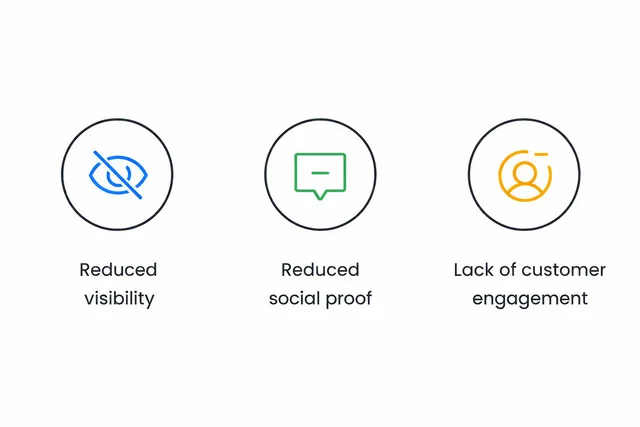
Missing reviews aren't just a cosmetic issue. They directly damage three things that drive revenue: local search visibility, buyer trust, and customer engagement. Here's what's actually at stake when reviews don't publish.
Reduced Local Search Visibility
Google's local ranking algorithm treats review count, review velocity, and review quality as core ranking factors. When reviews get filtered out, your profile loses ranking weight in the local pack and Google Maps results.
The businesses that dominate local search aren't always the biggest, they're the ones with steady, recent, keyword-rich reviews. If ten customers leave reviews this month and six get filtered, you're competing with four. Your competitor with fewer customers but cleaner review signals will outrank you.
This compounds fast. Lower rankings mean fewer profile views, fewer profile views mean fewer review opportunities, and the gap widens every month.
Weakened Social Proof
Consumers read reviews before they buy. BrightLocal's consumer review survey consistently shows that over 90% of buyers check reviews before choosing a local business, and most won't consider a business with fewer than 10 recent reviews.
When a prospect lands on your profile and sees 12 reviews instead of the 40 you've actually earned, they don't know the difference. They just see a business that looks less established than your competitor with 80 visible reviews. The filtered reviews are invisible to them, and so is the trust they should be building.
This is especially damaging in high-consideration industries like legal, medical, home services, and finance, where buyers lean heavily on review volume to feel safe choosing you.
Lost Customer Engagement and Feedback Loops
Reviews are a two-way channel. They tell you what's working, what's broken, and what customers actually value. When reviews get filtered, you lose the signal.
You can't respond to a review you can't see. You can't fix a recurring complaint if the complaints are buried in the spam filter. And you can't thank a loyal customer publicly if their five-star review never surfaces.
Active, visible review responses also send trust signals to Google. Profiles with consistent owner responses rank better and convert better. Every filtered review is a missed opportunity to demonstrate responsiveness to both the algorithm and future customers.
The Compounding Revenue Impact
Here's the part most businesses underestimate: these three problems feed each other.
Lower visibility means fewer clicks. Fewer clicks mean fewer customers. Fewer customers mean fewer reviews. And the reviews you do earn keep getting filtered because the profile looks less active and less trusted to Google.
Fixing missing reviews isn't a cleanup task. It's a growth lever. Every recovered review restores ranking weight, rebuilds social proof, and reopens the feedback loop that keeps the profile healthy.
How Long Do Google Reviews Take to Show?
Most Google reviews appear within minutes. Some take up to 48 hours. A small percentage (flagged or borderline) take up to a week.
Here's the realistic timeline:
-
0 to 15 minutes: Standard reviews from established accounts
-
1 to 24 hours: Reviews from newer accounts or with minor policy edge cases
-
24 to 72 hours: Reviews flagged for secondary moderation
-
7+ days or never: Reviews caught permanently by the spam filter
If a review hasn't appeared after 7 days, it's not coming. Move to the fixes above.
How Many Google Reviews Do You Actually Need?
Missing reviews hurt more when you're already behind your competitors on review count. The gap between you and the top-ranked business in your local pack is often smaller than you think, and closing it is usually the fastest way to climb rankings.
If you've lost reviews to filtering or removal, the first step is knowing exactly how many more you need to rank first. Use the Google Review Calculator to compare your current review count against your top local competitors and see the exact number of reviews required to overtake them.
This matters because recovering filtered reviews is only half the battle. The other half is earning enough new ones to offset the reviews Google has removed or will remove in the future.
Why You Can See Your Review But Others Can't
This is shadow filtering, and it's more common than most people realize.
Google sometimes displays a review only to the person who posted it. The reviewer sees it live and assumes everything worked. Meanwhile, the public, including you, sees nothing. It's Google's way of handling borderline reviews without notifying the user.
How to confirm: Ask the reviewer to open your business listing in incognito mode or on a different device while logged out. If they can't see their review either, it's been filtered for everyone.
How to fix: Treat it like any filtered review. Edit the content, clean up flagged elements, and let the reviewer's account build more trust over time.
Can Google Delete Reviews Automatically?
Yes. Google's algorithm removes reviews without warning or notification, and it happens constantly.
The system runs continuous sweeps against the review corpus. If a review later matches new spam signals (for example, the reviewer's account gets flagged for suspicious activity on other listings), every review they've left can get retroactively removed.
You won't get an email. The review count on your profile will simply drop. This is why businesses sometimes "lose" reviews weeks or months after they were posted.
There's no universal appeal process for algorithmic removals. The only recourse is a new, legitimate review from the customer.
Read more: Do Google Reviews Expire & How Does It Impact Businesses?
How to Prevent Reviews From Disappearing
Prevention is cheaper than recovery. Build a review pipeline that doesn't trigger filters in the first place.
Request reviews gradually. Don't blast 50 review requests in one day. Spread them across weeks.
Avoid scripted language. If every review says "Great service, highly recommend," the pattern reads as fake. Ask customers to mention specifics: what they bought, who helped them, what problem got solved.
Encourage detailed reviews. Longer, specific reviews have higher trust scores and survive filters better.
Never offer incentives. Discounts, freebies, or contests tied to reviews violate Google's policy and get entire batches removed.
Don't review from your own business Wi-Fi. If employees or relatives post reviews from the same IP as your business location, Google flags them fast.
Respond to reviews professionally. Active response signals a legitimate, engaged business and strengthens profile trust.
The safest approach is to get consistent Google reviews over time, rather than in bursts. Tools like ReviewGrow are designed to automate this process and keep your review flow natural and compliant.
Final Take
Missing Google reviews almost always trace back to one of three causes: the filter caught it, the content broke policy, or the reviewer's account didn't pass the trust threshold. Run the diagnostic checklist, fix what you can, and build a slower, cleaner review pipeline going forward.
If reviews keep disappearing despite clean content and legitimate customers, the issue is usually on the business profile side: duplicate listings, verification problems, or a suspension you haven't noticed yet. Audit the profile before you audit the reviewers.
The businesses that stop losing reviews are the ones that treat Google's moderation as a system to work with, not a bug to fight.
Frequently Asked Questions
Why is my Google review not showing publicly?
Google's spam filter or policy moderation hid it. The most common causes are new reviewer accounts, links or phone numbers in the review, VPN use, or bulk posting patterns. Check the review content first, then the reviewer's account history.
How do I make my Google review visible?
Have the reviewer edit the review to remove flagged content (links, promotional language, off-topic text), then save. Editing retriggers moderation. If the account is new, ask them to complete their Google profile and leave a few unrelated reviews first to build trust.
Why did my Google reviews disappear?
Google re-scans reviews continuously. If a reviewer's account gets flagged later, or if Google updates its spam detection, existing reviews can be removed retroactively. Profile suspensions, listing merges, and policy violations also cause sudden drops.
Can Google block reviews automatically?
Yes. Google's algorithm blocks, hides, or removes reviews without notifying the business or reviewer. Automated moderation handles the vast majority of removals. Manual review by Google staff is rare and usually only happens after a formal report.
Why are my Google reviews not showing up on my phone but visible on desktop?
This is a mobile app caching issue, not a filtering problem. Force-close the Google Maps app, clear its cache in your phone settings, and reopen it. The review will refresh within minutes.
How do I know if my Google review was filtered or just delayed?
Check the review's age. If it's under 48 hours old, it's delayed. If it's over 72 hours old and still invisible in incognito mode, it's filtered. Reviews missing after 7 days are permanently removed.
Can I repost a Google review that didn't show up?
No. Google blocks duplicate reviews from the same account and filters reposts faster. Instead, ask the reviewer to edit the original review or wait 14 days and write a completely new one in different words.
Do Google reviews show up immediately after posting?
Most Google reviews appear within 15 minutes. Reviews from new accounts or unusual locations take 24 to 72 hours. Flagged reviews can take up to 7 days, and some never publish.
Why does my Google review count keep dropping?
Google re-scans reviews continuously and removes any that fail updated spam checks. The most common cause is reviewer accounts getting flagged later, which retroactively removes every review they've left, including yours.
Rebecca Stone
Online Reputation ConsultantRebecca Stone is an Online Reputation Consultant who's all about helping people build their brand and win over customers. She loves sharing what she knows, so she writes for the ReviewGrow blog, giving readers the scoop on how to get ahead.