How do you track customer actions in Google Business Profile?
July 8, 2026
 Rebecca Stone· Online Reputation Consultant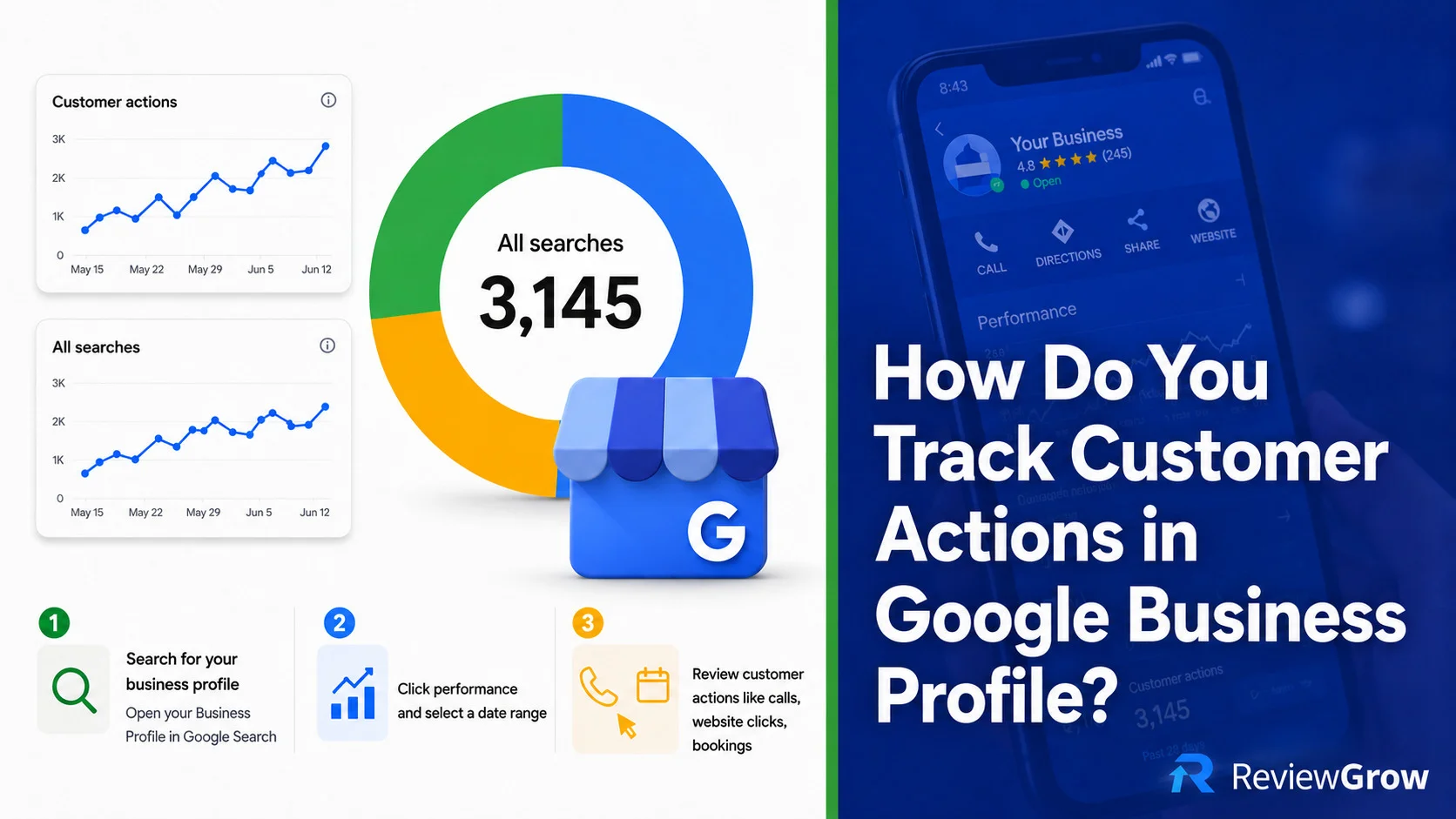
Understanding how customers interact with your Google Business Profile is critical for optimizing your local SEO strategy and improving your conversion rates. By analyzing the right metrics, you can transform raw engagement data into actionable insights for your business.
Key Takeaways
-
Google Business Profile's 'Performance' tab tracks direct customer interactions like calls, clicks, and bookings.
-
Native metrics provide visibility into engagement but do not capture full conversion paths.
-
Using UTM parameters and Google Analytics 4 is essential to bridge the gap between profile engagement and website results.
Quick answer: You track customer actions in Google Business Profile through the Performance tab, where Google shows you calls, website clicks, direction requests, bookings, and messages generated by your listing. That data tells you how people are engaging with your profile, but it only goes so far. If you want to know what happens after someone clicks, you need UTM parameters and Google Analytics 4 in the mix too.
Where to Find Customer Actions in Google Business Profile
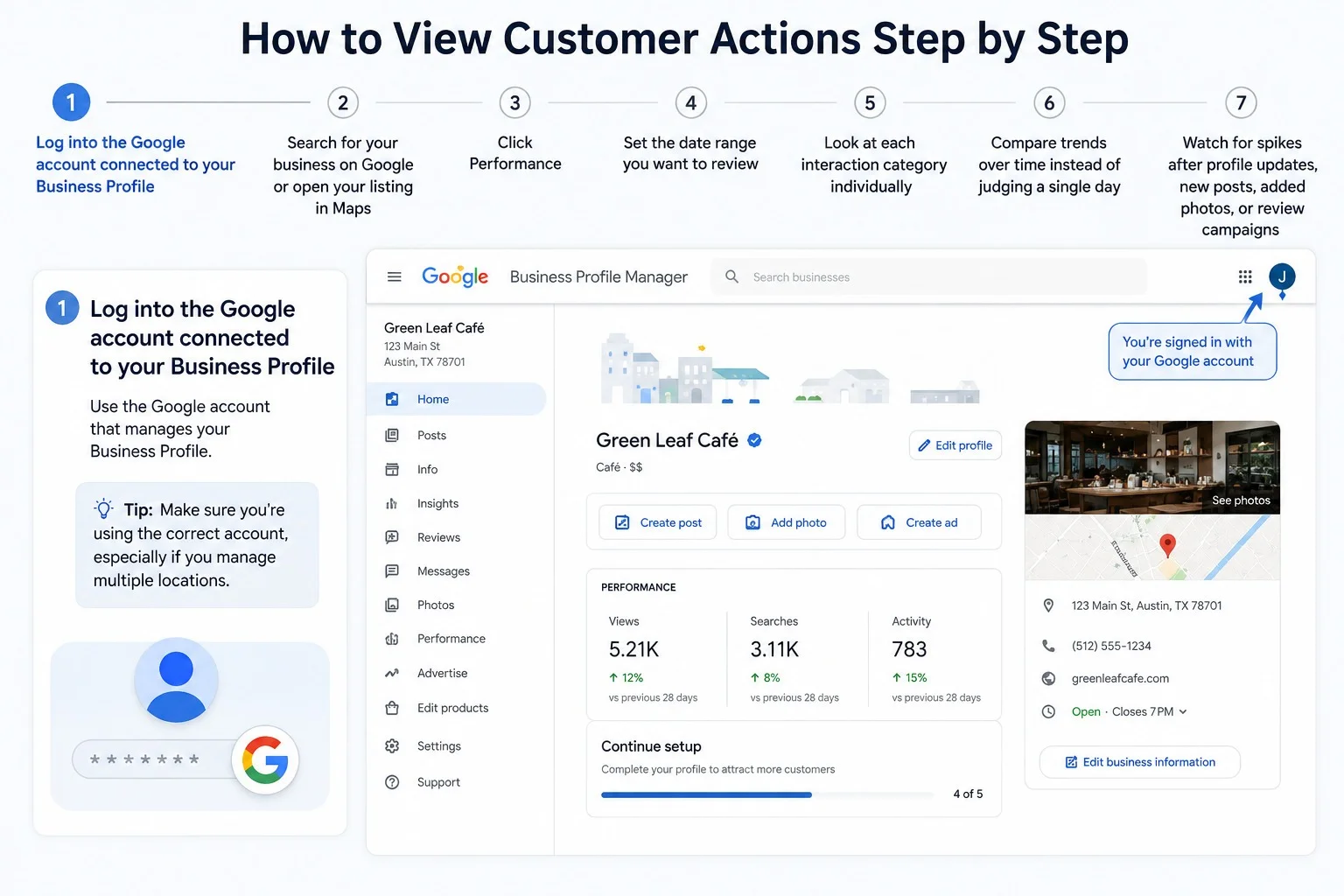
The short answer is the Performance tab. Here's exactly how to get there:
1. Search for your business while signed into the Google account that manages the profile
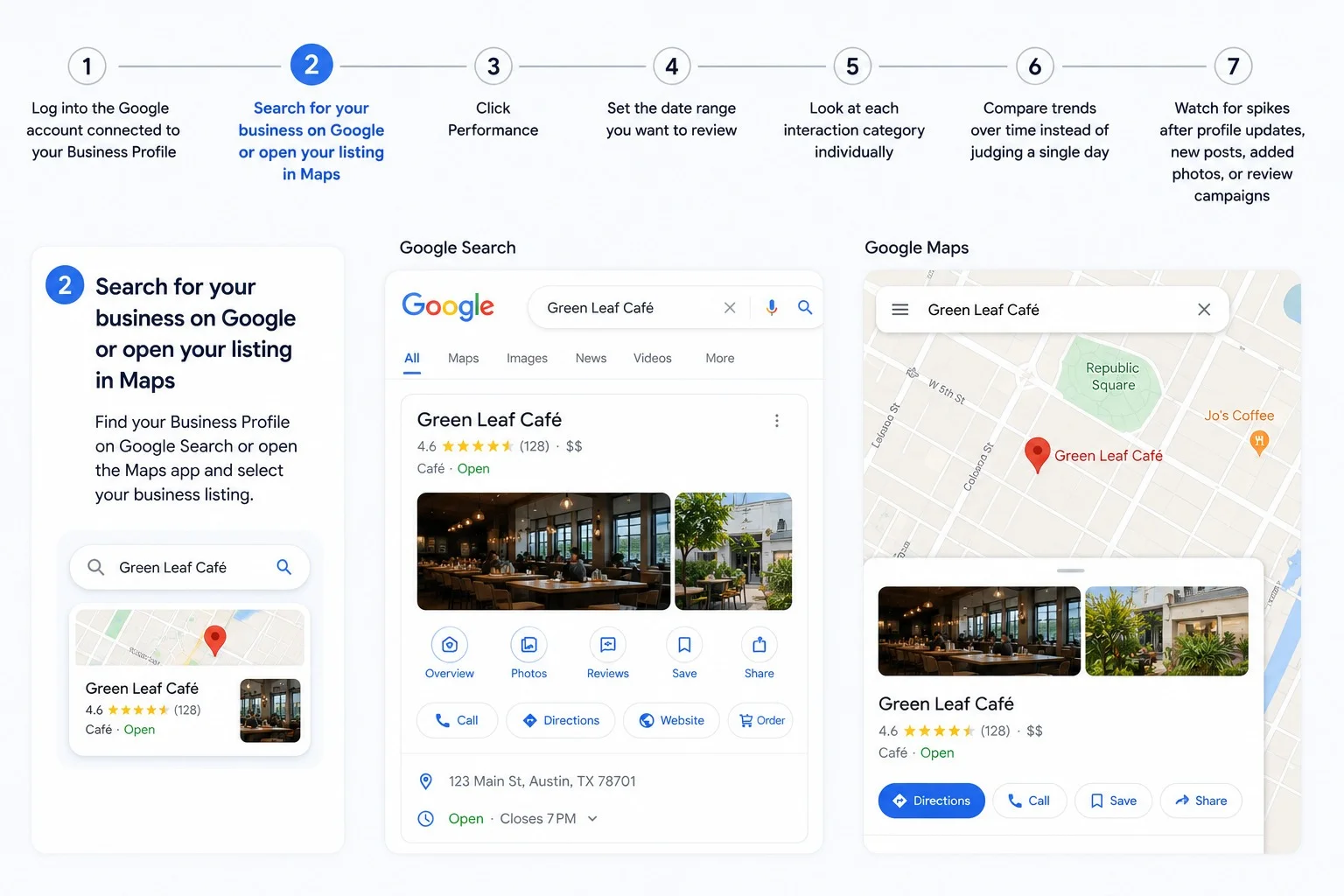
2. Open your Business Profile dashboard from Google Search or Google Maps
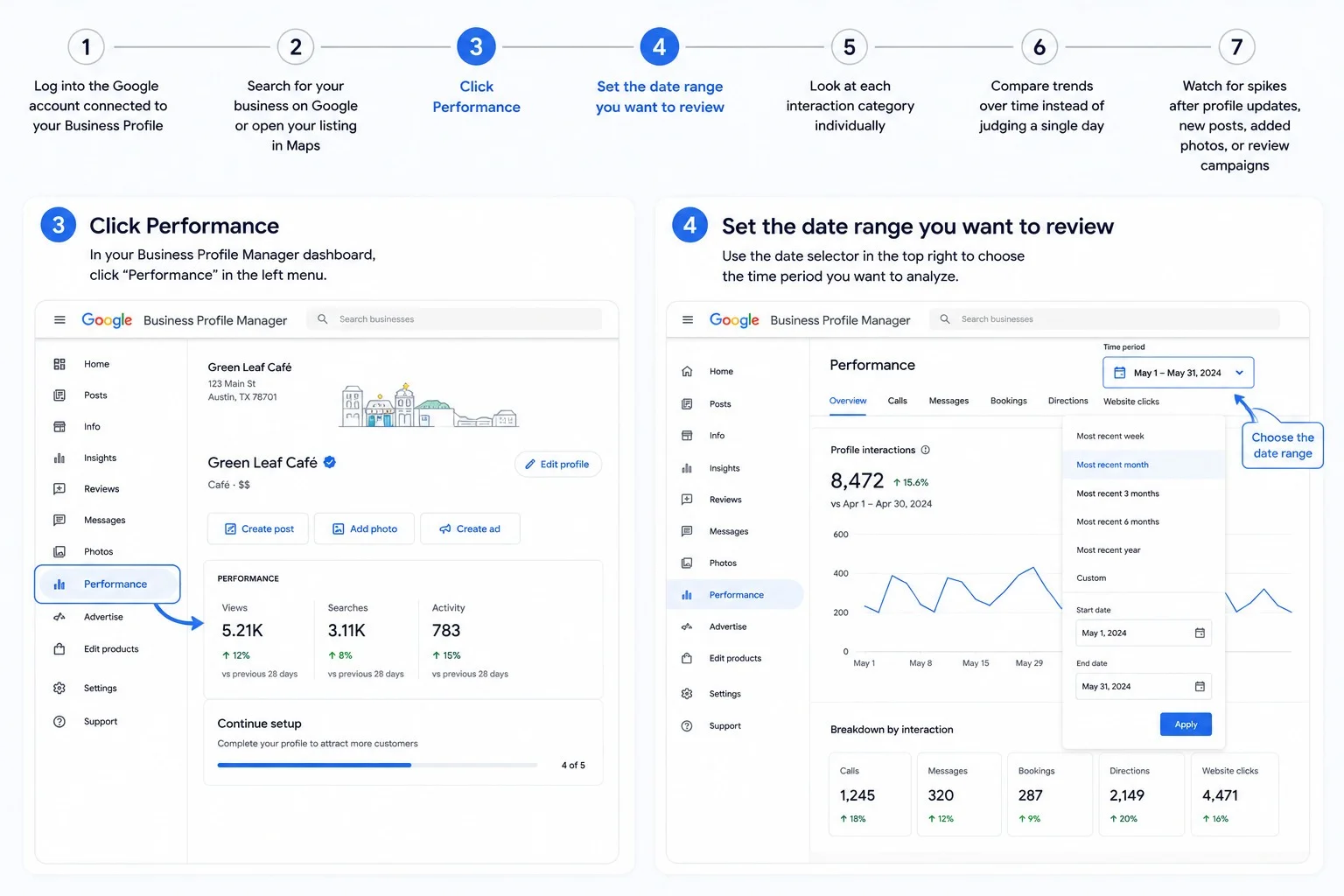
3. Click Performance
4. Choose a date range
5. Review the customer interactions listed, including calls, website clicks, bookings, and direction requests
That's the whole path. No plugins, no third-party dashboard required to see the basics. Google surfaces this data directly inside the profile you already manage.
Read more: How to Edit Google Reviews (Step-by-Step Guide for Desktop & Mobile)
What Customer Actions Can Google Business Profile Track?
Google Business Profile tracks a specific set of actions people take after they find your listing. Not every business sees every metric. What shows up depends on your category, the features you've enabled, and how customers are searching.
Calls
This counts how many times someone tapped the call button on your profile. It's one of the clearest bottom-of-funnel signals you'll get, especially useful for service businesses, contractors, clinics, and anywhere appointments matter.
Website clicks
This tracks clicks from your profile to your website. It tells you someone was interested enough to leave Google and visit your site, but it stops there. GBP won't show you what they did once they landed.
Direction requests
This measures how many people asked Google Maps for directions to your location. It's a strong signal of local intent and foot traffic potential, particularly valuable for brick-and-mortar businesses.
Bookings
If you have a booking integration enabled, GBP tracks how many people booked directly from your profile. Salons, clinics, restaurants, and service providers tend to lean on this metric most.
Messages
If messaging is turned on for your profile, you'll see how many people started a conversation with your business instead of calling or clicking through. This is another direct lead-generation signal.
Other interaction types
Depending on your business category and the features Google has rolled out, you might also see food orders, menu clicks, or product interactions. Not every profile gets every one of these, so don't expect a uniform list across industries.
How to View Customer Actions Step by Step
Here's the full walkthrough for pulling and actually using this data:
1. Log into the Google account connected to your Business Profile
2. Search for your business on Google or open your listing in Maps
3. Click Performance and set the date range you want to review
5. Look at each interaction category individually
6. Compare trends over time instead of judging a single day
7. Watch for spikes after profile updates, new posts, added photos, or review campaigns
That last step matters more than most people realize. If you update your profile and see actions increase two weeks later, that's a signal worth acting on, not a coincidence to ignore.
What the Customer Action Metrics Actually Tell You
Raw numbers only matter if you know how to read them. Here's how to interpret shifts in your data:
• Calls rising means your profile is generating stronger bottom-of-funnel intent
• Direction requests rising means local foot traffic intent is improving
• Website clicks rising while calls stay flat usually means people need more information before they're ready to convert
• Views staying high while actions stay low usually means visibility is fine, but something on the profile itself isn't converting
|
Metric |
What it suggests |
What to check next |
|
Calls |
High intent, ready-to-contact leads |
Business hours, call handling, service pages |
|
Website clicks |
Interest in learning more |
Landing page UX, conversion rate, UTM tracking |
|
Direction requests |
Visit intent |
NAP accuracy, map pin, opening hours |
|
Bookings |
Strong conversion action |
Booking completion rate, provider setup |
|
Messages |
Lead inquiries from your profile |
Response speed, FAQs, availability |
What Google Business Profile Doesn't Track Well
This is where a lot of business owners get a false sense of certainty. GBP shows you that an action happened, not what it led to. It does not fully show you:
• Which website clicks turned into actual conversions or sales
• Detailed on-site behavior once someone lands on your website
• Multi-touch attribution across channels
• Deep lead-source attribution beyond the initial click
• Call quality or call outcomes
• The exact conversion value tied to each interaction
If you're only looking at the Performance tab, you're seeing activity, not results. Closing that gap takes a bit more setup.
How to Track Google Business Profile Actions More Accurately
Add UTM parameters to your website link
Tagging the website URL on your profile with UTM parameters lets you isolate GBP traffic inside Google Analytics 4 instead of lumping it in with generic organic search. A simple example looks like this:
?utm_source=google&utm_medium=organic&utm_campaign=gbp
If you manage multiple locations, build unique UTM values for each one so you can compare performance location by location instead of guessing which listing is doing the work.
Use Google Analytics 4 to track post-click behavior
Once someone lands on your site from your profile, GA4 picks up where GBP leaves off. You can track sessions from GBP traffic, engagement rate, form submissions, phone-click events, and completed bookings if you have that set up. This is where you actually see what the click was worth.
Use call tracking if phone leads matter
A dynamic or call-tracking number can tell you call volume and outcomes with far more detail than the native call count. Just be careful with implementation. Swapping numbers carelessly can create NAP inconsistency, which works against your local SEO instead of helping it.
Track bookings inside your booking platform or CRM
If bookings are a priority, don't treat the GBP number as the full picture. Cross-check it against actual completed bookings inside your booking tool or CRM so you know how many of those clicks actually turned into paying appointments.
Best Practices for Using Customer Action Data
• Review trends monthly instead of reacting to single-day snapshots
• Compare actions before and after profile updates to see what actually moves the needle
• Monitor which locations generate the most calls and clicks if you manage more than one listing
• Test stronger business descriptions, service lists, photos, and calls to action
• Keep hours, categories, and contact details accurate, since errors quietly suppress actions
• Use review growth and response management to build trust that improves conversion rate
• Pair GBP data with GA4 and CRM data so you're working from results, not just activity
Common Reasons You May Not See Many Customer Actions
If your numbers look thin, one or more of these is usually the reason:
• Low visibility for the searches your customers actually use
• An incomplete or weak profile that gives people little reason to act
• Missing website, booking, or messaging features
• Weak star rating or a thin volume of reviews
• A category selection that doesn't match what customers are searching for
• Genuinely low local demand for your service or product
• Actions that are happening but aren't fully attributable inside GBP alone
Read more: How to Change Your Business Name on Google My Business (Without Getting Suspended)
Final Take
You track customer actions in the Performance tab of your Google Business Profile. It shows calls, website clicks, direction requests, bookings, and messages tied to your listing. For the full picture of what those actions actually produce, combine that native data with UTM tracking, GA4, and call or booking tracking on your end. Native GBP data tells you people are engaging. Everything else tells you whether that engagement is worth anything.
Frequently Asked Questions
How do I see customer actions in Google Business Profile?
Open your Business Profile from Google Search or Maps, click Performance, and select a date range. You'll see customer interactions such as calls, website clicks, bookings, and direction requests listed there.
Where is the Performance tab in Google Business Profile?
It's inside your Business Profile dashboard, accessible after you sign in and search for your business or open your listing in Maps. Look for the tab labeled Performance.
Can Google Business Profile track phone calls and website clicks?
Yes. Both are tracked natively. Calls count how many times someone tapped the call button, and website clicks count how many times someone clicked through to your site from the profile.
Does Google Business Profile show which clicks turned into sales?
No. GBP shows that a click happened, but it doesn't show what the visitor did afterward or whether it led to a sale. You need Google Analytics 4 or a CRM to close that gap.
How do I track Google Business Profile traffic in Google Analytics?
Add UTM parameters to the website URL listed on your profile, then check GA4 for sessions, engagement, and conversions coming from that tagged source.
Why are my Google Business Profile views high but customer actions low?
High views with low actions usually means visibility isn't the problem. Something on the profile itself, like weak photos, an unclear description, or missing contact options, is likely holding back conversions.
Does Google Business Profile track direction requests?
Yes. It counts how many people tapped for directions through Google Maps, which is a strong indicator of local foot traffic intent.
Can I track bookings made through Google Business Profile?
Yes, if you have a booking integration enabled. GBP will show the number of bookings made directly from the profile, though it's smart to cross-check that number against your booking platform or CRM.
Does every Google Business Profile show the same customer actions?
No. The metrics available depend on your business category and which features are enabled, such as messaging or booking. Not every profile shows every action type.
How often should I check my Google Business Profile performance data?
Monthly reviews work best for spotting real trends. Checking daily tends to overreact to normal fluctuation instead of showing you what's actually changing.
What's the difference between profile views and customer actions?
Views count how many people saw your listing. Customer actions count what they did next, such as calling, clicking through to your website, or requesting directions. Views measure visibility, actions measure engagement.
Do I need call tracking if Google Business Profile already tracks calls?
GBP gives you a call count, but not call quality or outcomes. If phone leads are a major part of your business, call tracking adds detail that native GBP data doesn't provide.
Rebecca Stone
Online Reputation ConsultantRebecca Stone is an Online Reputation Consultant who's all about helping people build their brand and win over customers. She loves sharing what she knows, so she writes for the ReviewGrow blog, giving readers the scoop on how to get ahead.