How to Change Your Business Name on Google My Business (Without Getting Suspended)
June 16, 2026
 Chris Patterson· Local SEO Specialist
If you're searching for how to change business name on Google My Business, you're in the right place. The platform is now officially Google Business Profile, though plenty still type the old name into search. I've guided dozens of local businesses through name changes, from typo fixes to full rebrands, and I've seen what trips people up: moving too fast, skipping documentation, or triggering Google's spam filters by accident. This guide covers the safe way to update your name, keep your reviews intact, and avoid a suspension that wipes out your local rankings overnight.
Quick Answer: The 4-Step Process to Update Your Name
Here's the short version of how to change your Google Business Profile name. If you only read one section, read this one.
Log into the Google account tied to your listing, search your exact business name on Google to pull up your profile, then:
-
Open Edit Profile. Click the Edit profile icon (the pencil icon) inside the merchant menu on the search results page.
-
Go to Business Info. Select the Business info tab, find the Business name field, and click the pencil icon next to it.
-
Type the new name. Enter your updated name exactly as it appears on your signage, website, and legal documents.
-
Save. Click Save and give it time to process.
Minor edits, like fixing a typo, usually go through within minutes with reviews staying put. Bigger changes, like a full rebrand, can trigger an algorithmic review, ask for re-verification, or temporarily hide reviews while Google double checks things. That's normal. Don't resubmit the same edit five times in a row.
The Golden Rule: What to Do Before You Change Your Name on Google
Here's what most guides skip: what you do before touching that pencil icon matters more than the edit itself. Google's algorithm doesn't just read your new name, it checks whether the rest of the internet agrees with you.
Aligning Your Digital Footprint (Website & Citations)
Update your business name everywhere else first: your website's homepage, footer, and contact page, your social bios, and directories like Yelp or Bing Places. Google cross-references your profile against your local SEO citations and your site's NAP data (name, address, phone) to confirm you're a real, consistent business rather than someone gaming the system. If your website still says "Smith Plumbing" while your Google profile says "Smith & Sons Plumbing," that mismatch alone can flag your edit for review or a soft suspension. Fix the digital footprint first, then make the change on Google.
Read more: How to embed Google reviews on your website
Gathering Legal Proof of Rebranding
If you're doing a full rebrand and not just fixing a typo, pull your paperwork together first: an updated business registration or LLC filing, a recent utility bill showing the new name and address, and photos of your real-world signage if it's changed. You won't need this during the edit, but if Google flags the change for review, having proof ready means responding in minutes instead of scrambling for a week.
Step-by-Step Guide: How to Change Your Name in the New Dashboard
Google retired the old GMB dashboard a while back, so if you're following outdated instructions, you're hunting for buttons that don't exist anymore. Here's what the current interface looks like.
Read more: How to edit Google reviews
Step 1: Access Your Profile Directly via Google Search or Maps
Skip business.google.com unless you manage profiles at scale. The fastest route for most owners is searching your exact business name on Google or pulling it up on Maps. Once your knowledge panel appears, you'll see a pencil icon for editing. This works whether you're changing your business name on Google Maps or through standard search, since both pull from the same profile.
Step 2: Open the "Edit Profile" Modal
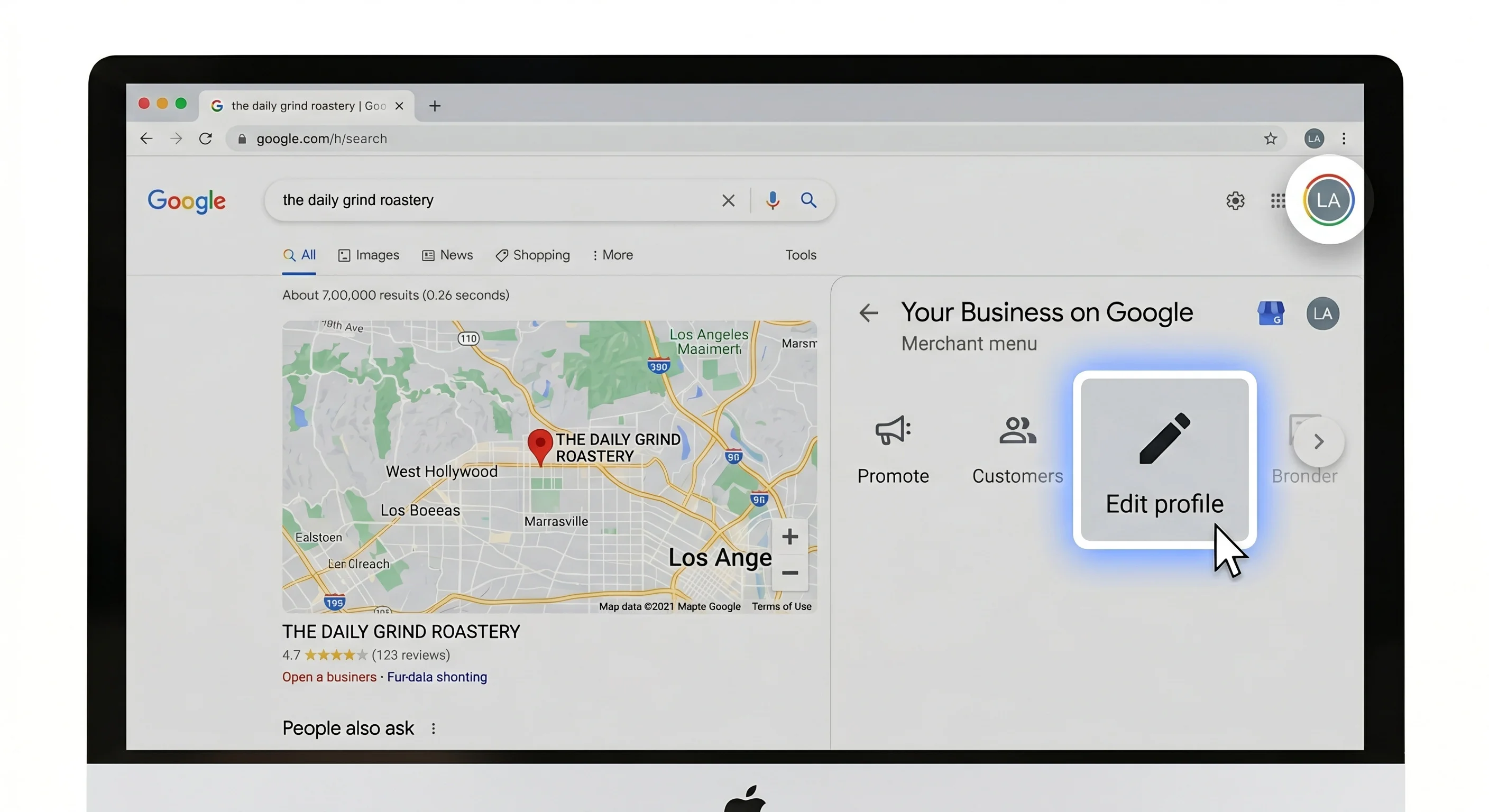
Click the pencil icon and select Edit profile from the merchant menu. This opens a window with tabs across the top: Business info, Contact, Location, Hours. You want Business info specifically, whether this is your first time learning how to edit Google Business Profile details or the layout shifted since your last visit.
Step 3: Input Your New Name & Avoid Trigger Words
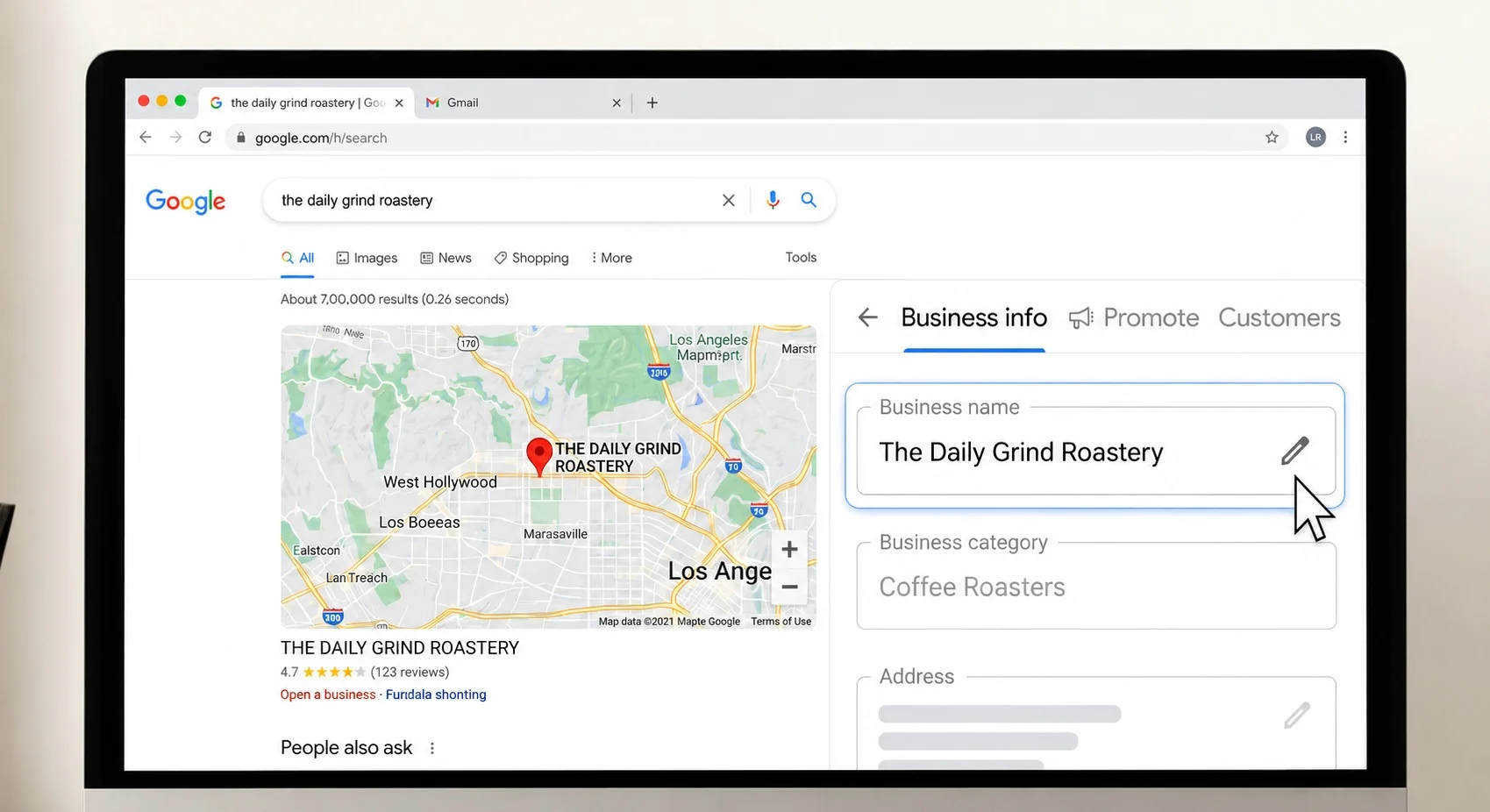
Inside the Business info tab, find the Business name field and click its pencil icon. Type your new name exactly as it should appear: no extra keywords, no city names, no service descriptions. Google's guidelines are strict here. Your profile name should match your real-world business name, full stop.
Pro Tip: Resist adding "Best" or your city name to the business name field, even if competitors do it. Keyword stuffing is one of the fastest ways to trigger a suspension review, and it rarely helps even when it works short term.
Step 4: Save and Monitor Your Verification Status
Click Save. Most minor updates process within minutes. Larger changes can trigger re-verification, where Google confirms you still own and operate the business, sometimes through a postcard, phone call, or video check. Watch your verification status over the next 24 to 48 hours. If nothing's changed after a few days, it's usually sitting in a manual review queue, not stuck for good.
Will I Lose My Reviews? The Impact of Name Changes on Local Reputation
If retaining reviews after a name change is your biggest worry, here's when you need to stress and when you don't.
Read more: How to check your Google reviews
Minor Tweaks vs. Complete Rebranding: How Google Treats Reviews
Correcting a typo or wording tweak leaves your reviews exactly where they are, since Google treats it as the same business with a cosmetic update. A complete rebrand is different. Changing "Mike's Auto Repair" to "Precision Auto Care" still counts as one business if your address, phone number, and category stay the same, but it can trigger a temporary review hold while Google reconfirms the entity. I've watched this resolve anywhere from a few hours to about a week. The reviews aren't deleted, just paused from public view during the cross-check.
What to Do If Your Reviews Disappear After an Update
Don't touch anything else on the profile. Further edits while reviews are hidden restart the clock. Give it 7 to 10 business days before assuming something's wrong. If reviews still haven't returned, open a request through the Google Business Profile Help Center and reference the exact date of your name change. Most cases I've handled resolve once support confirms the identity matches across citations, and reviews repopulate on their own.
Troubleshooting: How to Handle Algorithmic Rejections & Suspensions
If your edit gets rejected outright, or worse, your whole listing goes dark, take a breath. This is almost always an automated decision, not a human targeting your business, and it's fixable.
Read more: How to search Google reviews by name
For specific issues like changing a business name on an unverified profile, you can also check this community discussion for troubleshooting tips.
Why Google Rejects Name Changes Automatically
Google's system is built to catch spam and deceptive listings, so it reacts fast when something looks off. A google business profile name change rejected notice usually comes down to one of these: your new name doesn't match your website yet, you've added location or service keywords outside your legal name, or you changed your name and phone number at the same time, which reads as account takeover behavior to the algorithm. Industries like locksmiths and personal injury law face extra scrutiny given their history of fake listings. None of this means you did anything wrong, just that the system flagged a pattern you now need to disprove.
How to Open a Support Ticket and Provide "Real-World" Proof
If you're dealing with a google business profile suspension after name change, don't keep resubmitting the same edit. Repeated attempts look like the spam behavior Google watches for, and can turn a soft suspension into a full hard suspension that's much harder to reverse.
Fix your website and directory listings first so they match your new name. Then gather your proof: business registration or LLC paperwork, a current utility bill, and photos of signage or a company vehicle. Head to the Google Business Profile Help Center and file a reinstatement request, stating clearly that you've legally changed your business name. When the automated reply lands, respond and attach your documents directly.
Pro Tip: Keep your message factual and short. Google's support team works from a compliance checklist, not emotion, so a state filing or signed lease does more than a paragraph explaining your situation.
Keeping Your Local Rankings Intact Post-Change
A name change shouldn't cost you your map pack rankings if you handle the rest of your profile carefully.
The Dangers of Keyword Stuffing Your New Name
I know it's tempting to slip "Chicago" or "Plumber" into your business name field for an SEO boost. Don't. Google Business Profile guidelines explicitly prohibit this, and it tends to backfire anyway since Google increasingly suppresses listings that violate naming policy once flagged. Keep your real name in that field and do your keyword work in the business description and posts instead, where it's allowed and where it actually sticks.
Managing Name Updates Across Multiple Locations Safely
If you're rebranding more than one location, don't change every listing the same day. Update one, confirm it processes cleanly, then move to the next. Doing them all at once multiplies your support burden if something gets flagged and makes it harder to isolate which listing caused the trouble. I usually stagger updates by three to five days each, which gives a clean signal if one location runs into an issue while the rest sail through.
Summary Checklist for a Safe Rebrand
Before you touch the pencil icon, run through this:
-
Update your website's homepage, footer, and contact page with the new name
-
Match your name across Facebook, Instagram, Yelp, and other directories
-
Gather your business registration, a utility bill, and signage photos
-
Avoid adding location or service keywords to the name field
-
Update one location at a time if you manage multiple profiles
-
Don't change your name, phone, and address all at once
-
Expect a possible re-verification request for major rebrands
-
Wait 7 to 10 days before escalating a review issue
-
Keep any reinstatement request factual and document-backed
Final Take
Ultimately, changing your business name on Google is a manageable task, provided you approach it with the same care as a legal update. By aligning your digital footprint beforehand, gathering necessary documentation, and avoiding common pitfalls like keyword stuffing, you minimize the risk of disruptions. If you do hit a snag, stay patient—most issues, including review dips or algorithmic flags, are temporary and resolvable with the right evidence.
Frequently Asked Questions
How long does it take for Google to approve a business name change?
Minor edits like typo fixes often process within minutes to a few hours. Larger rebrands can take 1 to 10 business days if Google flags the edit for review. Past two weeks with no update, contact the Google Business Profile Help Center directly.
Can I change my business name if my profile is currently unverified?
Yes, you can edit the name field on an unverified profile, but the change may not go live until verification completes. If you're mid-verification already, finish that first since editing core details mid-process often resets the timeline.
Will changing my name affect my ranking in the Google Maps Local Pack?
A like-for-like rebrand (same address, phone, category) usually doesn't hurt rankings long term, though you may see a short dip while Google reconfirms the listing. Rankings typically recover within one to two weeks once your website and citations match everywhere.
What legal documents does Google ask for during a manual name review?
Google typically wants proof your business legally operates under the new name: a business registration or LLC filing, a tax certificate, a recent utility bill matching the name and address, or photos of signage and vehicles.
How do I change my business name on Google Maps specifically?
There's no separate process for Maps. Search your business on Maps, tap your listing, select Edit profile, then go to Business info and update the name field. Maps and standard search pull from the same profile, so the change applies everywhere at once.
Will I lose my reviews if I change my business name?
Minor corrections never affect reviews. A full rebrand can temporarily hide reviews while Google verifies it's the same business, but they aren't deleted. Reviews typically reappear within a few days to a week once verification completes.
Why was my Google Business Profile name change rejected?
Rejections usually happen because your new name doesn't match your website or directories yet, includes keywords or location terms outside your legal name, or because you changed multiple core fields at once, which reads as suspicious to Google's algorithm.
What triggers a suspension after a Google Business Profile name change?
Suspensions typically stem from digital footprint mismatches, keyword stuffing in the name field, or simultaneous edits to your name and contact details. High-risk categories like locksmiths or personal injury law face stricter automated review whenever a core field changes.
How do I edit my Google Business Profile if I don't see the pencil icon?
The pencil icon only shows up if you're logged into the Google account that owns or manages the profile. If it's missing, confirm you're signed into the right account, or check whether you've been added as a manager under the profile's user settings.
Can I add keywords to my business name on Google Business Profile?
No. Google's guidelines only allow your actual, legal business name in that field. Adding location terms or services, like "Chicago" or "24/7 Plumber," violates policy and risks suspension. Save keyword language for your business description and posts.
How do I appeal a suspended Google Business Profile after a name change?
File a reinstatement request through the Google Business Profile Help Center, explain the legitimate name change, and attach proof like a business registration or utility bill once the automated reply arrives. Keep it factual.
Should I update my website before or after changing my Google Business Profile name?
Before. Google cross-references your profile against your website and other citations when you submit a name change. If your site still shows the old name, that mismatch can trigger a delay or rejection. Update your website and directories first, then make the Google edit.