Can You Leave an Anonymous Google Review (Full Guide)
March 31, 2026
 Rebecca Stone· Online Reputation Consultant
Short answer: Yes, you can leave a partially anonymous Google review. You can hide your real name from the public, but Google still knows who you are behind the account.
If you just want privacy from other people, it’s easy.
If you’re aiming for full anonymity… that’s where things get more nuanced.
To choose the right method for your situation, you first need to understand the critical difference between being invisible to other users and being invisible to Google itself.
What “Anonymous” Actually Means on Google
Let’s clear this up simply.
On Google Maps, what you get is pseudonymity - not full anonymity.
That means:
-
Your public name can be hidden
-
Your real identity still exists behind the account
Therefore, it means you are anonymous to users but not anonymous to Google.
This distinction is exactly where most articles fail, and where users get confused.
Why Google Maps Updated Its Privacy Policy for Reviews
This change didn’t happen randomly.
For years, people hesitated to leave honest Google reviews because everything was tied to their real name. Leaving negative feedback about an employer, a lawyer, or even a local business could feel uncomfortable, or even risky.
At the same time, platforms that allowed anonymity were gaining popularity because users felt safer sharing real experiences there.
So Google had to adapt.
Around 2025, they introduced display names to strike a balance between privacy and control. The goal was to encourage more people to leave genuine reviews without fear of being publicly exposed, while still keeping enough oversight to prevent spam and abuse.
There’s also a bigger shift happening in search. With AI-driven tools and platforms surfacing real user experiences more than ever, authenticity has become a key ranking factor.
People don’t just want polished business descriptions, they want honest, human feedback. But that only works if users feel safe enough to share it.
In simple terms, Google made this change to get more real reviews into the system, without losing trust in the platform.
How to Post Anonymous Google Review Step-by-Step
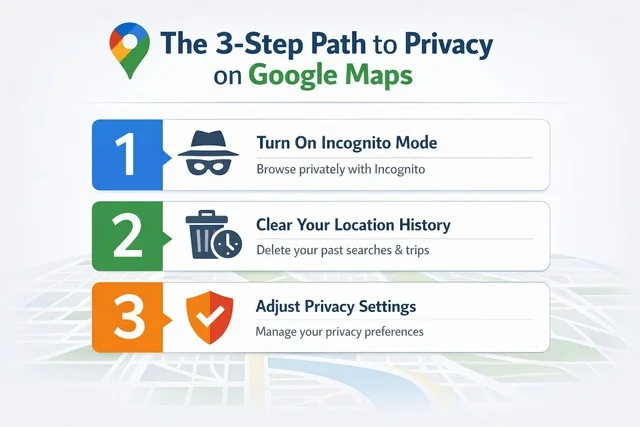
Note: While Step 1 (Incognito) is perfect for private browsing, you must be signed into an account (Method 1 or 2 below) to actually post a review. Use Incognito to research the business, then switch to your alias to post.
Method 1: Use a Custom Display Name (Fastest Way)
This is the easiest option and what most people will use.
How to leave an anonymous Google review (step-by-step)
-
Open Google Maps
-
Tap your profile icon (top right)
-
Select Your Profile / Contributions
-
Tap Edit Profile
-
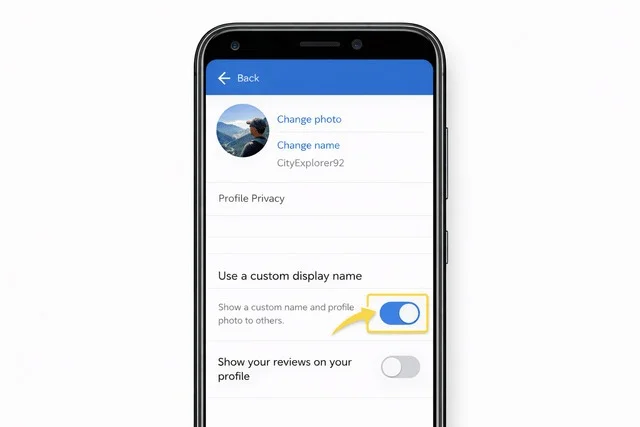
Enable Custom display name & profile photo
-
Enter your alias (e.g., “CityExplorer92”)
-
Save your changes
-
Search for the business and post your review
Below: Where to find the “Use a custom display name” toggle in the Google Maps “Edit Profile” menu.
This takes about a minute, but there’s one detail most people miss.
Important: Display Name vs Account Name
-
Your display name = what people see on reviews
-
Your account name (Google profile / “About Me”) can still be your real name
Changing the display name:
-
Updates how your reviews appear
-
Does NOT fully erase your real identity from your account
Also worth knowing:
If you’re a Local Guide, your level and contributions:
-
Stay the same
-
Are still visible under your alias
So yes, your reputation carries over, just under a different name.
Warning: If you have 50 previous reviews under your real name, switching to an alias will "unmask" those old reviews to that new alias. If those old reviews had photos of your face or mentioned your city, your new "anonymous" persona is instantly compromised.
Method 2: Create a Separate Google Account (More Private)
If you want stronger separation, this is the safer route.
You create a completely new Google account and use it only for reviews.
This means:
-
No connection to your main account activity
-
No past reviews linked
-
More control over your identity
This method makes the most sense when:
-
You’re leaving a negative review
-
You’re reviewing an employer or legal service
-
You want zero overlap with your main account
It’s not perfect anonymity, but it’s the closest you’ll get.
The Reality Check: Is Your Identity Truly Hidden?
Here’s the reality, without fluff.
-
Other users only see your display name
-
Businesses (via their Google Business Profile) cannot access your personal details
-
Your review still exists under a Google account
Behind the scenes:
-
Google can still connect activity to your account
-
Behavior patterns are tracked
So yes, you’re private publicly. And no, you’re not invisible.
Troubleshooting: Why Can’t I See the Custom Alias Option?
If the "Edit Profile" menu doesn't show the option to use a custom display name, don’t panic. This is a common hurdle due to how Google staggered the 2025–2026 rollout.
Common reasons the feature is missing:
-
Regional Rollout: Google often releases privacy features in "waves." Your specific region may still be on the legacy interface.
-
Outdated App Version: Ensure you are running the latest version of Google Maps from the Play Store or App Store.
-
Workspace vs. Personal Accounts: If you are signed into a Google Workspace account (work or school email), your administrator may have disabled name-masking features.
-
Device Fragmentation: The mobile app typically receives these updates before the desktop (browser) version of Google Maps.
The Fix: If you’ve checked for updates and the option still isn't there, don’t waste time troubleshooting. The most reliable "workaround" is to jump straight to Method 2 and create a separate, dedicated review account. This bypasses the need for the specific alias toggle entirely and provides a higher level of long-term privacy.
Do Anonymous Google Reviews Still Count?
Yes, anonymous Google reviews absolutely still count.
Whether you’re using a custom display name or a separate account, your review is treated the same as any other. It will appear publicly on the business listing, contribute to the overall rating, and influence how other users perceive that place.
From Google’s perspective, what matters isn’t your name, it’s how authentic your behavior looks. A review written under a pseudonym can still carry full weight if it feels genuine and consistent with normal user activity. On the other hand, even reviews with real names can get filtered if they seem spammy or manipulative.
So if your concern is whether your anonymous review will “matter,” the answer is yes. It can impact visibility, trust, and even ranking signals tied to a business’s Google Business Profile. The key is not whether your identity is hidden, but whether your review looks real.
If you're looking to improve your reputation strategy alongside organic feedback, you can also explore trusted platforms where businesses ReviewGrow explains how to safely buy Google reviews without risking your profile.
What are "Verified Visit" Signals and How Do They Work?
In 2026, Google’s AI (SpamBrain) is more aggressive than ever at filtering reviews that look like AI-generated spam or "ghost reviews" from users who were never actually at the business.
Even if your name is hidden, your behavior must look real. Google now prioritizes Verified Visit signals to decide which reviews stay public.
-
What is a Verified Visit? Google cross-references your review with your device’s encrypted Location History. If Google "saw" your phone at that business recently, your anonymous review is 10x more likely to stick.
-
The "Trust Score": Accounts that regularly contribute from verified locations carry a higher "Trust Score." If you use a fresh account with zero location history to leave a 1-star review, it will likely be shadowbanned (hidden from the public).
Pro-Tip: If you’re using a separate account for privacy, keep Location History turned on for that account for at least 24 hours before and after your visit. This "proves" to the algorithm that you are a real human customer, making your review nearly impossible to filter as spam.
Smart Tips (Where Most People Mess Up)
This is where things quietly go wrong.
Keep it simple:
-
Write like a real person, not a script
-
Avoid posting multiple reviews in a short burst
-
Don’t create an account just to leave one aggressive review
-
Add normal activity (searching places, browsing, etc.)
Google tracks patterns, not just identity.
Read more: How to Get More Google Reviews for Your Business: Proven Ways
The Truth About Your Privacy
Let’s not sugarcoat it.
Using an alias gives you a solid level of privacy in everyday situations. Your real name isn’t visible to the public, which means less exposure and a lot more comfort when leaving honest feedback. For most people, that’s exactly what they need.
But it’s important to understand the limits. This isn’t full anonymity, and it doesn’t make you legally invisible. Your activity is still tied to an account behind the scenes.
The best way to think about it is simple: it’s safe enough for real life, but not completely untraceable.
Is Leaving an Anonymous Google Review Allowed?
Yes, it’s completely allowed to use a display name when leaving reviews.
Where people run into problems isn’t anonymity, it’s behavior. Reviews become an issue when they’re fake, paid, or clearly written to manipulate ratings. That’s what leads to removals or penalties, not the fact that you’re using a nickname.
As long as your review is genuine and follows the rules, you’re fine.
Can You Change Your Alias Later?
Yes, you can update your display name and profile photo anytime.
It’s flexible, but there’s one detail to keep in mind. When you change your alias, it doesn’t apply only to new reviews, it updates how your existing reviews appear as well. So everything stays consistent under your latest name.
Will Your Old Google Reviews Change Too?
Yes, and this catches a lot of people off guard.
The moment you switch to a custom display name, your past reviews automatically update to reflect it. There’s no separation between old and new content.
That’s exactly why some people prefer creating a separate account instead. It keeps their previous activity completely untouched and avoids mixing identities.
Final Take
If you strip everything down, this isn’t really about “tricking the system” or being invisible, it’s about feeling safe enough to be honest.
Using a display name gives you that everyday layer of comfort. It’s quick, simple, and for most situations, it does the job. You can share your experience without attaching your real name to it, and that alone removes a lot of hesitation.
But if the situation feels more sensitive - like reviewing an employer, a legal service, or anything that could come back to you - then creating a separate account is the smarter move. It creates distance, keeps your main activity untouched, and gives you more control.
At the same time, it’s important to stay grounded in reality. On Google, anonymity is more about how you appear publicly, not about disappearing completely. Your activity is still tied to an account, and Google’s systems are built to recognize patterns and prevent abuse.
So the real goal isn’t to be invisible. It’s to be private, realistic, and credible.
If your review sounds natural, reflects a real experience, and fits normal user behavior, it will count and it will stay. That’s what actually matters for both visibility and impact on a business’s Google Business Profile.
In the end, think of it this way: you’re not hiding, you’re just choosing how much of yourself you show.
Frequently Asked Questions
Can you leave an anonymous Google review without an account?
No. You must have a Google account to leave a review. Even if you use a nickname, the review is still tied to an account behind the scenes.
How do I hide my name on a Google review?
You can hide your real name by enabling a custom display name in your profile settings or by creating a separate account with a nickname.
Is it possible to leave a completely anonymous Google review?
No. You can stay anonymous publicly, but Google still knows which account posted the review.
Can businesses see my email or personal details?
No. Businesses only see your display name and public profile. They do not have access to your private account information.
Can Google track my anonymous review?
Yes. Even with a pseudonym, your activity is linked to your account and can be tracked internally.
Will my review be removed if I use a fake name?
No, not because of the name itself. Reviews are removed if they look fake, spammy, or violate Google’s policies, not simply for using an alias.
Does using an alias affect my Local Guide level?
No. Your Local Guide points, level, and contributions remain the same, just displayed under your chosen name.
Rebecca Stone
Online Reputation ConsultantRebecca Stone is an Online Reputation Consultant who's all about helping people build their brand and win over customers. She loves sharing what she knows, so she writes for the ReviewGrow blog, giving readers the scoop on how to get ahead.