How to Recover and Get Your Missing Google Reviews Back (Step-by-Step Guide)
April 23, 2026
 Rebecca Stone· Online Reputation Consultant
You logged into your Google Business Profile this morning, glanced at your review count, and your stomach dropped. Reviews are missing. Maybe five. Maybe fifty. Maybe that glowing five-star testimonial from your best customer last week is just… gone.
Take a breath. We’ve got you on this.
This guide walks you through exactly how to recover missing Google reviews, based on what has actually worked for our clients, Google's official documentation, and verified guidance from Google Business Profile Product Experts. We'll cover the real reasons reviews disappear, how Google's moderation system works, and the exact steps (plus the support message template our team uses) to get reviews restored.
How to Check If Your Reviews Are Actually Missing
Before you spend hours opening support tickets, confirm the reviews are genuinely gone. In roughly a third of the cases our team investigates, the reviews were never actually missing, the business owner was just looking in the wrong place or viewing a cached version of the profile. Run through this quick verification process first.
1. Compare Your Current Review Count to Your Records
Open your Google Business Profile dashboard and note the current total number of reviews. Compare it to:
-
A recent screenshot of your profile
-
Notification emails from Google when reviews came in
-
Your reputation management tool's historical records (if you use one)
If the count matches your records, nothing is missing. If it's lower, move to the next check.
2. View Your Profile From an Incognito Window
Your Google Business Profile dashboard sometimes lags or caches. To see exactly what customers see:
-
Open a private or incognito browser window
-
Search for your business on Google
-
Count the visible reviews on the public Business Profile panel
If reviews appear publicly but not in your dashboard, it's a display glitch, not a removal. Wait 24 hours and check again.
3. Ask the Reviewer to Check From Their Own Account
This is the single most effective test for distinguishing filtered from deleted reviews. Ask the customer to:
-
Log into the Google account they used to post the review
-
Navigate to Google Maps → Profile icon → Your contributions → Reviews
-
Confirm whether their review still appears in their list
If the review is still visible to them but not to the public, it's filtered, not deleted. This is recoverable.
If the review is gone from their account as well, either they deleted it, their account was removed, or Google took it down for a policy violation.
4. Check on Both Desktop and Mobile
Google occasionally rolls out display updates unevenly. A review that appears missing on desktop may still show on mobile (and vice versa). Check:
-
Google Search on desktop
-
Google Maps on desktop
-
Google Maps mobile app
-
Your Google Business Profile mobile app
If the review appears on any of these, it's a propagation delay, not a removal.
5. Confirm You're Looking at the Correct Profile
This sounds obvious, but we see it regularly: businesses with multiple locations, duplicate listings, or recently merged profiles sometimes look at the wrong Business Profile ID. Double-check:
-
The business name and address on the listing
-
That you don't have a duplicate or suspended secondary listing
-
That a recent profile merge didn't move reviews to another location
Only after these five checks confirm a real loss should you move on to the recovery process below.
While recovering lost reviews, businesses can also benefit from an instant AI review writer for generating fresh review examples and testimonials
How to Recover Missing Google Reviews Step-by-Step
The process below is the exact workflow our reputation managers use when handling missing review cases for clients. We've run this playbook successfully for our own business and for long-term clients, and it's recovered real reviews (more on the results at the end of this section). Follow the steps in order.
Step 1: Access Google Support
To start the recovery process, open Google's official Business Profile support page: https://support.google.com/business/gethelp.
This is the only legitimate entry point for missing review cases. Avoid third-party "review recovery" services that claim backdoor access, they don't have it, and using them can put your profile at risk.
Step 2: Select Your Business
Once you're on the support page, select your business from the drop-down menu and provide Google with the requested account information. If you manage more than one location or Business Profile, double-check that you've selected the exact profile where the reviews went missing. Submitting a case under the wrong profile is one of the most common reasons requests get rejected or ignored.
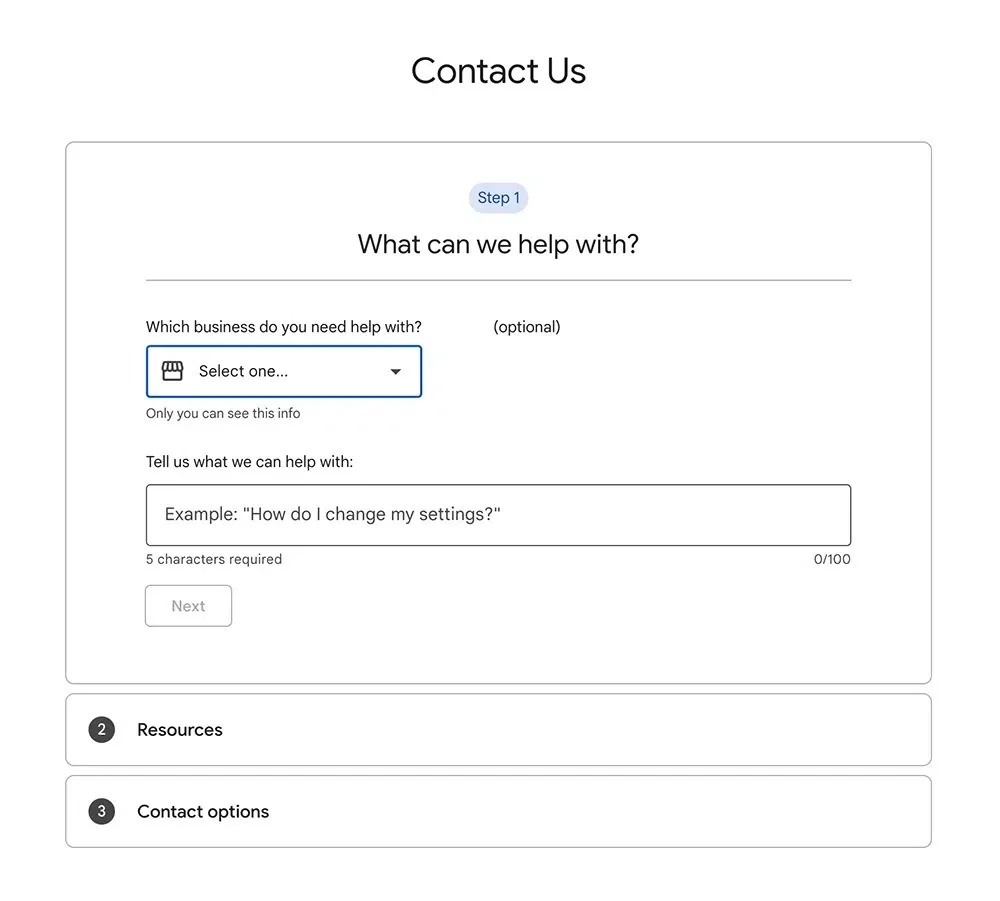
Step 3: Describe the Issue
In the "Tell us what we can help with" field, type in "Google Reviews Missing" so your request is routed to the correct team, then click Next.
A set of topic boxes will appear below. Select "Review Missing" and click Next Step.
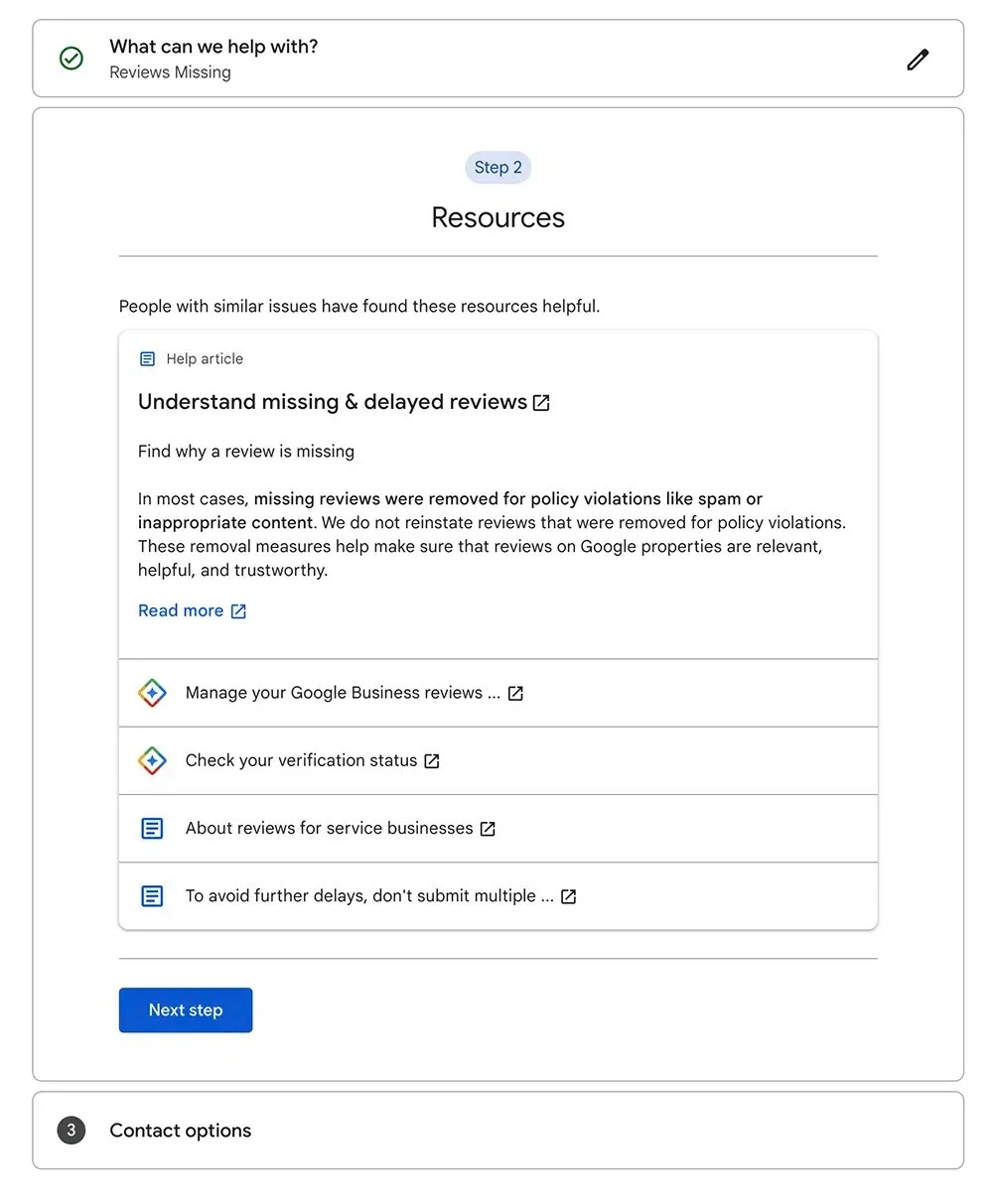
Google will then show you a page of self-help resources. Read through them briefly (sometimes the answer is there), then click Next Step again to continue to the contact options.
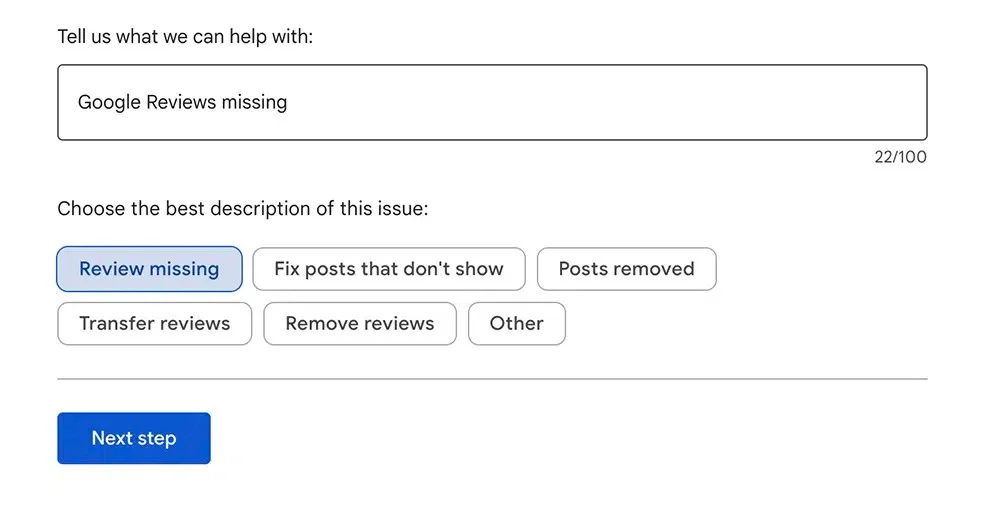
Once you hit “Next Step” you will be given resources to read. Click “Next Step” again.
Step 4: Fill Out the Email Form and Submit
You'll now see a button labeled Email. Click it to open the full contact form.
This is where a clear, structured message dramatically improves your odds. Use this template:
Subject: Missing Legitimate Reviews on Google Business Profile
Hello Google Support Team,
I am writing to report missing reviews on my Google Business Profile (Business Name: [Your Business], Profile ID: [ID]).
As of [date], I noticed [X number] of genuine customer reviews are no longer visible on my profile. These reviews were left by verified customers and did not violate Google's review policies.
Details of missing reviews:
-
Reviewer Name: [Name], Date: [Date], Rating: [Stars], Content: [Summary]
-
Reviewer Name: [Name], Date: [Date], Rating: [Stars], Content: [Summary]
I have attached screenshots and supporting documentation for your reference. These reviews reflect authentic customer experiences, and their removal appears to be in error.
Could you please investigate and, if appropriate, restore these reviews? I am happy to provide any additional information needed.
Thank you for your time and assistance.
[Your Name] [Business Name] [Contact Information]
Step 5: Check Your Inbox Regularly
Once your request is submitted, monitor your email inbox every couple of days. Google's first response often comes from a "no-reply" style address, so check your spam and promotions folders as well. Missing the first reply can add days to the resolution timeline.
Step 6: What to Do Once Google Responds
Here's the step where most business owners give up, and it's exactly the wrong move.
Google's first response is almost always an automated message listing the generic reasons reviews might go missing. Because it doesn't feel like a "real" reply from a support agent, many people assume this is the end of the road. It isn't.
Scroll to the bottom of that automated email and you'll see a sentence along the lines of:
"For general info about your Business Profile, we recommend our Help Center, Help Community, and YouTube channel. If you need more help than these resources, give a reply to this email. We'll be glad to assist."
That single line is the key. Replying to it is what moves your case from automated triage into a real human queue.
Step 7: Write Back and Request More Help
When you reply, you'll be assigned a dedicated support agent who will work with you directly on the case. Keep your response short, polite, and clear. The template we use:
"The resources provided did not help me resolve the issue. Please advise on how I can get my reviews reinstated. Thanks, [Your Name]"
That's it. Don't over-explain or vent. The goal of this message is simply to confirm you need human assistance and trigger assignment to an agent.
Step 8: Provide Any Additional Information Requested
Once assigned, the support agent may ask for additional details like screenshots of the missing reviews or the full list of reviewer names. Provide whatever you have.
If you don't have screenshots and don't feel it's appropriate to contact customers for proof, it's perfectly valid to say so. A template we've used successfully:
"I have had several customers inform me that they submitted reviews, but due to the nature of my business working with customers, it is not appropriate to request screenshots or bother them further. I kindly request your assistance in reinstating the missing reviews."
In our experience, agents accept this reasoning more often than people expect, especially when the rest of your case is well-documented.
Step 9: Resolution
If the missing reviews were filtered or removed in error, this is typically when they get reinstated. Real results from our own case work:
-
Rise Visible (our own business): 5 reviews recovered
-
Long-term ReviewGrow client: 15 reviews recovered in a single case
-
Additional recoveries for a painting contractor we worked with and a partner company they subcontract to
The final Google response confirming reinstatement usually arrives as a short email letting you know the reviews have been reviewed and restored. Save that email. It's useful documentation if the same issue ever recurs.
Our recommendation: run this process as a quarterly audit, not just when you notice reviews missing. Set a calendar reminder every 90 days to compare your current review count against your records and open a case if anything is off. Missing reviews are real business assets, and treating recovery as routine maintenance (rather than emergency response) is how the businesses we work with stay ahead of the problem. After recovering removed reviews, you can use Google review calculator to estimate how many additional positive reviews may still be needed to reach your target rating.
Read more: Why Are My Google Reviews Not Showing Up? (Causes + Fixes)
Why Your Google Reviews Disappeared
Before you can fix the problem, you need to know what caused it. Not every "missing" review is permanently gone, and the root cause determines your recovery path. The causes below are drawn from Google's official review policies and recurring patterns our team has documented in client cases.
Policy Violations (Spam, Links, Fake Content)
Google's automated systems remove reviews that break its prohibited and restricted content policies. The most common triggers we see in real cases:
-
Reviews containing URLs, phone numbers, or promotional content
-
Profanity, hate speech, or off-topic content
-
Reviews suspected of being fake or incentivized
-
Conflict-of-interest reviews from employees, competitors, or the business owner
-
Duplicate content posted across multiple listings
Google's Filtering Algorithm
Google uses machine learning to detect suspicious review patterns in real time. According to Google's own guidance to Product Experts, filtered reviews aren't deleted, they're hidden from public view. In our case management work, these are the most frequent filter triggers:
-
A sudden spike in reviews (review velocity anomalies)
-
Multiple reviews submitted from the same IP address
-
Reviews left by brand new Google accounts with no history
-
Reviews posted from the same physical location as your business Wi-Fi
Business Profile Suspension or Reinstatement
If your Google Business Profile was suspended and later reinstated, reviews sometimes don't return automatically. Based on the suspension cases our team has resolved, this is one of the most frustrating scenarios and almost always requires direct support intervention and manual escalation.
Technical Glitches and Delays
Sometimes reviews disappear because Google is updating its systems. Google Product Experts have publicly confirmed in the Google Business Profile Community Forum that these temporary disappearances often resolve on their own within 24 to 72 hours.
The Reviewer Deleted Their Account or Review
If the customer deleted their Google account or manually removed the review, it's gone permanently. There is no recovery path here, and no legitimate service can restore it.
Read more: Why Are Google Reviews Disappearing?
What to Do If Google Doesn't Restore Your Reviews
Sometimes you'll do everything right and still get a "we've determined the review does not violate our policies, therefore no action is required" response (or the reverse, a rejection citing a policy violation you don't agree with). When recovery isn't possible:
-
Accept the outcome and redirect your energy forward
-
Reach out privately to the original reviewer and ask them to repost in their own words
-
Launch a review generation campaign to rebuild social proof
-
Audit your review acquisition process to prevent future filtering
-
Diversify your reputation across other platforms like Yelp, Facebook, BBB, and industry-specific directories
One lost review will not sink your business. A slow, reactive response to review loss over time, however, can.
How to Prevent Losing Google Reviews Again
Prevention is significantly easier than recovery. These are the habits our team builds into every client's ongoing reputation management plan:
-
Monitor reviews weekly. Set a calendar reminder or use a reputation management tool.
-
Screenshot every new review. Treat it as your insurance policy.
-
Never incentivize reviews. Offering discounts, gifts, or services in exchange for reviews directly violates Google's policy and can put your entire profile at risk.
-
Avoid review gating. Filtering customers before asking for a public review is also against Google's guidelines.
-
Keep review velocity natural. Do not suddenly ask 50 customers in one week. Consistent is safer than spiky.
-
Respond to every review. Owner engagement signals profile legitimacy to Google's systems.
-
Ask reviewers to avoid including links, phone numbers, or competitor names. A quick note in your review request handles it.
If tracking reviews weekly, screenshotting every one, and monitoring velocity sounds like a lot to handle manually, there's a better way to manage your reviews on autopilot, with automated generation, archiving, and monitoring built in.
Pro Tips: What Most Guides Won't Tell You
These insights come directly from patterns we've observed across client cases and from verified guidance shared by Google Product Experts.
Signs your reviews are filtered, not deleted: The reviewer can still see their review when logged into their own Google account, but it doesn't appear publicly. If a customer tells you "I left you a review but I can't find it when I search for your business," it's almost certainly a filter, not a deletion. This distinction changes your entire recovery approach.
Review velocity matters more than volume. Going from 2 reviews per month to 30 overnight is a well-documented filter trigger. Aim for a consistent flow. Based on what we see work best, 4 to 8 new reviews per month steadily is far more valuable (and safer) than 50 in a single week followed by silence.
Red flags we've seen trigger Google's filter repeatedly:
-
Reviews posted from your business Wi-Fi network
-
Multiple reviews left on the same device or IP
-
Reviewers with zero review history or no profile photo
-
Overly similar language or templated phrasing across reviews
The safest way to ask for reviews: Send a personalized request 24 to 48 hours after the service experience, include a direct link to your Google review form, and let the customer write in their own words. Never draft the review on their behalf, and never send bulk identical requests.
Read more: Do Google Reviews Expire & How Does It Impact Businesses?
Final Take
Missing Google reviews feel like a crisis in the moment, but the vast majority of cases are either fixable or preventable. The businesses that recover fastest all share the same habits: they document everything, act methodically, use the correct support channels, and treat prevention as an ongoing discipline rather than a one-time fix.
Set a recurring calendar reminder to audit your review count every 30 days, keep a simple log of new reviews as they come in, and respond to each one as it's posted. Those three habits alone will catch most issues before they become emergencies, and position you to recover quickly when they don't.
Your reviews are business assets. Treat them like inventory: counted, protected, and accounted for.
Frequently Asked Questions
Why did my Google reviews disappear overnight?
The most common causes are Google's spam filter updates, a business profile suspension, a reviewer deleting their account, or a policy-triggered automatic removal. Occasionally it's a temporary indexing glitch that resolves within 72 hours without any action on your part.
How long does it take to recover missing Google reviews?
After submitting a detailed support request, expect 5 to 7 business days for a response based on the cases our team handles. Complex cases involving profile reinstatement can take 2 to 4 weeks. Filtered reviews sometimes return on their own within 24 to 72 hours.
Can Google restore deleted reviews?
Yes, if the removal was in error or the review was filtered rather than deleted. Google cannot restore reviews that the reviewer themselves deleted or reviews that genuinely violated published policy.
Do negative reviews get removed automatically?
No. Google does not remove reviews for being negative. Reviews are only removed when they violate specific content policies such as hate speech, spam, off-topic content, or conflicts of interest. A legitimate one-star review with real feedback will remain.
Can I contact Google directly about missing reviews?
Yes. Use the Google Business Profile support contact form inside your dashboard, select "Reviews and photos" then "Missing reviews," and choose chat or email. The Google Business Profile Help Community is the accepted escalation path for unresolved cases.
Does responding to reviews help prevent them from disappearing?
Indirectly, yes. Active profiles with consistent owner engagement are less likely to be flagged as suspicious, and engagement is a recognized positive signal in Google's broader profile quality evaluation.
Rebecca Stone
Online Reputation ConsultantRebecca Stone is an Online Reputation Consultant who's all about helping people build their brand and win over customers. She loves sharing what she knows, so she writes for the ReviewGrow blog, giving readers the scoop on how to get ahead.