How to Get More Google Reviews for Your Auto Repair Shop (The Ultimate Guide)
May 27, 2026
 Chris Patterson· Local SEO Specialist
If you want to know how to get more Google reviews for your auto repair shop, you are sitting on one of the highest-leverage moves in local SEO that most shop owners completely ignore. I have spent years managing online reputations for independent repair shops, and I can tell you with confidence: the shops dominating the Google Map Pack in their cities are not there by accident. They have a system for collecting reviews, and it runs almost on autopilot.
In this guide I am going to walk you through exactly how to build that system, step by step. No theory -just what actually works.
Why Google Reviews Are the Secret Fuel for Your Auto Shop's Local SEO
Before we get into tactics, you need to understand why this matters so much. Google reviews are not just a trust signal for customers flipping through your profile. They are a core ranking factor for local search visibility and prominence.
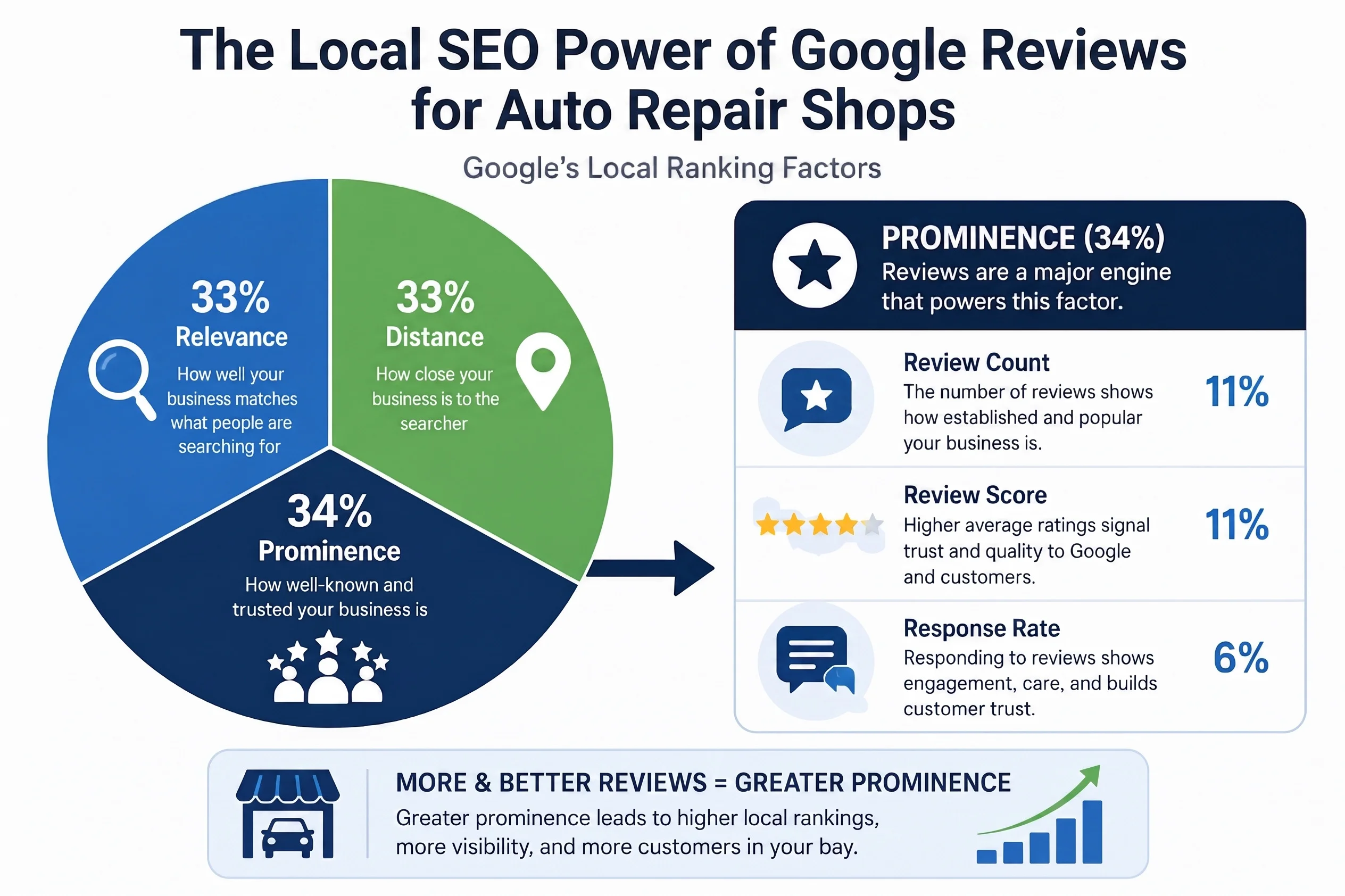
When someone in your city types "auto repair near me" or "oil change [your city]," Google decides which three shops to show in the Map Pack based on a combination of relevance, distance, and prominence. Reviews feed directly into that last factor.
Google's official documentation on how local rankings are determined states clearly that review count and review score both influence where your Google Business Profile appears in results. What most shop owners miss, though, is that review response rates also play a role. Shops that actively engage with their reviews signal to Google that the business is active and trustworthy.
For decades, auto repair ran on word of mouth marketing. A happy customer told their neighbor. That neighbor told a coworker. That model still works, but it is slow and unscalable. Digital reputation is word of mouth at scale. One 5-star Google review is visible to thousands of people searching in your market, permanently, for free.
According to research from Moz and other local SEO authorities, review signals account for a significant portion of Google Map Pack ranking factors. Shops with more reviews, higher average star ratings, and consistent review velocity consistently outrank competitors with similar proximity and relevance scores.
The good news? Getting more reviews is not about luck. It is about the process.
Read more: Why Are Google Reviews Important for Business Growth?
How to Get More Google Reviews for Your Auto Repair Shop
Strategy 1: Perfect the Timing (Strike While the Engine Is Warm)
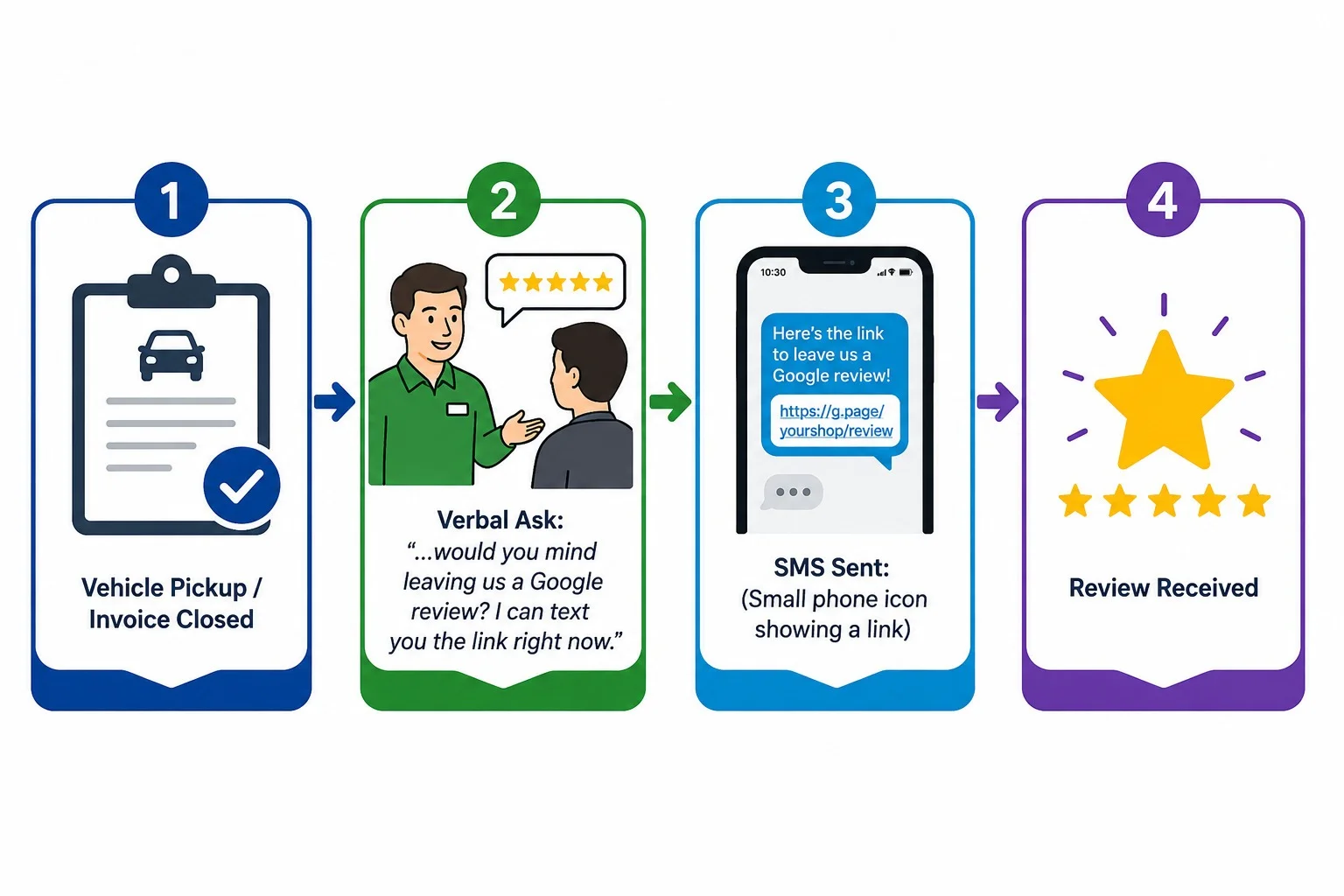
To get more Google reviews for an auto repair shop, timing is everything. Request reviews promptly via SMS or in person immediately following the service while the experience is still fresh. A customer who just picked up their vehicle, feels relieved it is fixed, and is happy with the price is at peak motivation to leave a review. Wait 48 hours and that window starts closing fast.
The Immediate Post-Service Ask
The highest-converting moment to ask for a review is right at the point of vehicle pickup. Not that evening. Not via an email the next morning. Right there at the front counter when the customer is signing off on the invoice and handing over their card.
Here is the script I train service advisors to use:
"We are really glad we could take care of your [vehicle] today. One quick favor, if you were happy with your experience, would you mind leaving us a Google review? It takes about 60 seconds and it genuinely helps our shop. I can text you the link right now."
That is it. No pressure. No awkwardness. Just a confident, direct ask at the right moment. This single habit, if practiced consistently by your front desk team, will outperform almost any automated review campaign you can set up.
Why does the post-service ask perform so well? Because the customer's emotional experience is at its peak. The anxiety of car trouble is gone. The invoice was what they expected. The service was fast. They feel good. That emotional state translates directly into review conversion.
Training Your Service Advisors
This is where most shops drop the ball. They know they should be asking for reviews, but they never train their team on exactly how to do it. The front desk feels awkward bringing it up. The service manager assumes someone else is handling it. Nobody does it consistently.
Here is how I fix that at every shop I work with.
First, make the ask a formal part of the checkout process, not an optional afterthought. Add "Request Google review" to your vehicle delivery checklist the same way you would add "Return all customer keys" or "Confirm warranty information." When it is a checklist item, it gets done.
Second, role-play the conversation with your team. Service advisors are usually great with customers, but they need a rehearsed, comfortable way to ask. Practice it in your next team meeting. Make it feel natural.
Third, measure it. Track how many reviews you receive each week and make it visible to your team. A little healthy competition between advisors goes a long way. Some shops I work with run a small monthly bonus tied to review count, and the results are dramatic.
When your service advisors are confident identifying satisfied customers and making the ask, you will see review volume climb without spending a single dollar on advertising.
Strategy 2: Launch Automated Auto Repair Google Review Campaigns
Training your team is essential, but humans are inconsistent. Someone calls in sick. The shop gets slammed on a Tuesday afternoon. The checkout process gets rushed. That is why you also need automation running in the background, catching every satisfied customer your team might miss.
Automated review requests for auto shops are now table stakes in reputation management. If your competitors are using them and you are not, they are building a review advantage compounding against you every single month.
Why Texting Wins
When it comes to review request channels, SMS is not even close to email. In my experience managing auto repair Google review campaigns, SMS review requests consistently get two to three times more responses than email follow-ups for quick turnaround services like oil changes, tire rotations, and brake jobs.
Why? Because people actually read their texts. The average SMS open rate is around 98 percent, compared to email open rates that hover in the 20 to 30 percent range for service businesses. A text hits a customer's phone within minutes of sending, the message is short, and the link is right there. One tap and they are on your Google review page.
For longer repair jobs where the customer has had more time to process the experience, email can still work as a secondary follow-up. But your primary review request channel should always be SMS.
Automated Review Requests for Auto Shops
The real power of SMS review campaigns comes when you automate them entirely. Here is how it works.
Most modern shop management software platforms, either have native review request features or integrate with reputation management tools. When an invoice is closed in your system, it automatically triggers a text message to the customer's phone number on file. That message includes your direct Google review link and a simple call to action.
The customer gets a text within minutes of driving off your lot. They are still in the car. They have nothing to do for the next ten minutes. They tap the link, leave a five-star review, and you never had to think about it.
To set this up, talk to whoever manages your shop management software or point-of-sale system. Ask specifically about review request automation or integrations with tools like Podium, Birdeye, or NiceJob. Most shops can have this running within a week.
This is the single most scalable thing you can do for your online reputation management, and the shops that put it in place early end up with review counts that are genuinely difficult for competitors to match.
Strategy 3: Eliminate Friction (Make It Effortless to Leave a Review)
Even a motivated customer will abandon the review process if it takes more than a few taps to get there. Your job is to make leaving a review so easy that there is no excuse not to do it.
How to Build Your Direct Google Review Link
A direct Google review link sends customers straight to the review box on your Google Business Profile, skipping all the extra clicks. Here is how to generate yours in three steps.
Step 1: Sign in to your Google Business Profile at business.google.com.
Step 2: In your profile dashboard, find the section labeled "Get more reviews" or "Share review form." Google provides a shortened link specifically designed for this purpose.
Step 3: Copy that link. Shorten it further with a tool like Bitly if you want something cleaner for printed materials. Test it on your own phone to confirm it opens directly to the review prompt.
That link is now the cornerstone of every review request you send, whether via text, email, your website, or printed materials.
To get car owners talking about your fast service and fair pricing, try setting up your business with a free Google review link that can be texted to clients as soon as their vehicle is ready for pickup.
Read more: How to Share and Create a Google Review Link in 2026 (Step-by-Step Guide)
Putting a QR Code on Invoices and Counters
This is one of my favorite tactics because it converts customers who might feel awkward leaving a review in front of your staff.
Generate a QR code that points to your direct Google review link using any free QR code generator. Then place it in two locations.
The first location is your printed invoices. Add the QR code to the bottom of every invoice with a simple line of text like: "Happy with your service? Scan here to leave us a quick Google review." A customer sitting in the waiting room or walking to their car can scan it before they even leave the property.
The second location is your front counter or waiting area. A small tabletop sign or a laminated card next to the credit card terminal puts the option in front of every customer at the moment of payment. Some shops I work with see spontaneous review scans throughout the day just from this one placement.
The combination of a QR code on invoices, a front counter display, and an automated SMS follow-up means you are hitting customers at multiple touchpoints without asking multiple times. Each touch is light and non-pushy. Together they create a system that generates a steady stream of 5-star Google reviews week after week.
Strategy 4: Master the Reply (Boost Visibility by Responding)
Here is something that surprises most shop owners when I tell them: responding to your Google reviews is not just good manners. It is an active ranking signal.
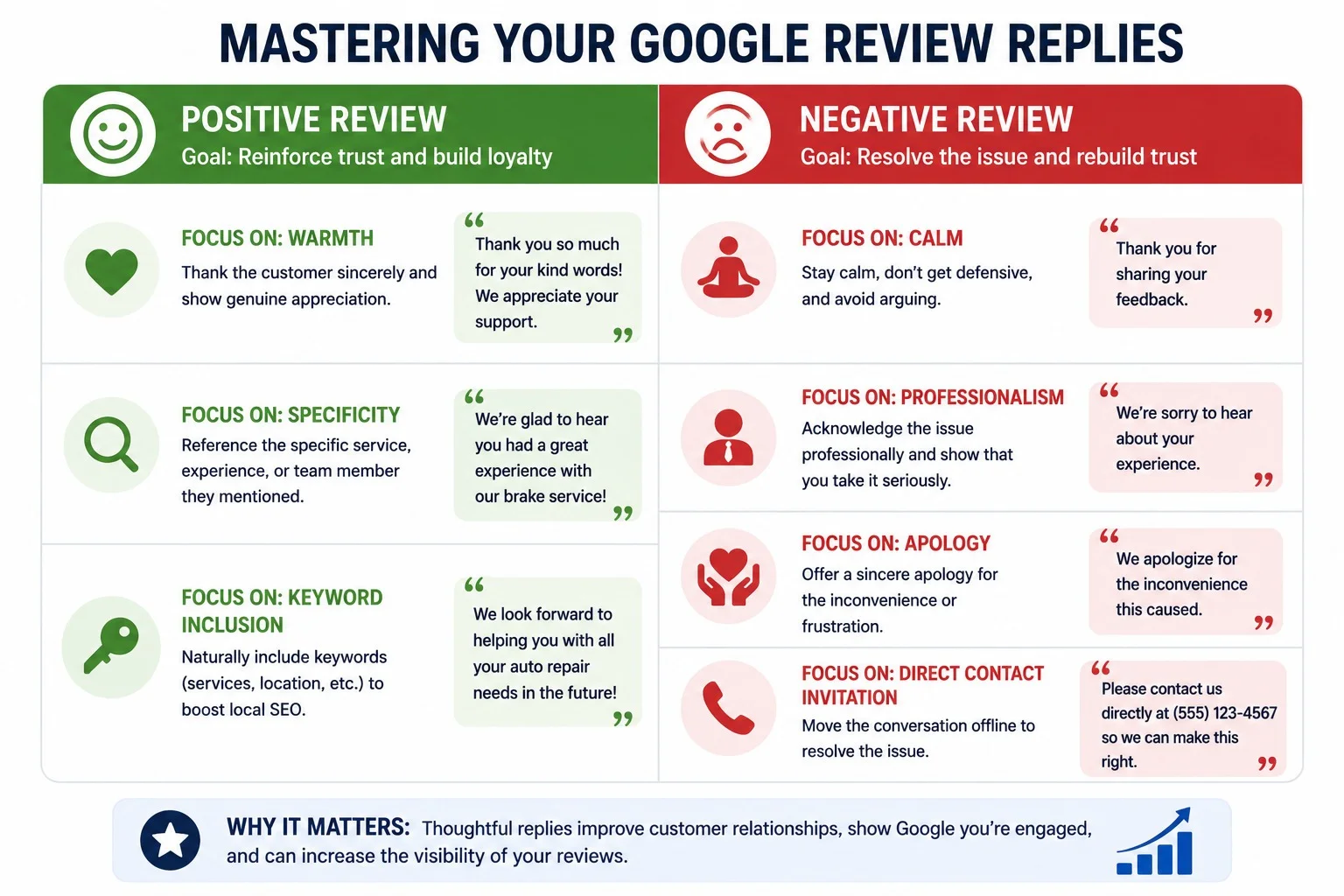
Google wants to see that your business is engaged and responsive. When you reply to reviews, you signal to the algorithm that your Google Business Profile is actively managed. That matters for local search visibility.
My recommendation is to respond to every review within 24 to 48 hours, positive or negative.
For positive reviews, keep your response warm but brief. Thank the customer by name if they left one. Mention the specific service if they referenced it. This does two things: it shows future customers that you care about individual experiences, and it adds keyword-relevant content to your profile naturally.
For negative reviews, stay calm and professional. Do not get defensive. Acknowledge the experience, apologize that they were not satisfied, and invite them to contact you directly to make it right. A well-handled negative review often impresses potential customers more than a perfect score with no engagement does. It shows you take customer experience seriously.
Responding consistently also builds trust with customers who are reading your reviews before choosing a shop. They are not just counting stars. They are reading how you show up when things go wrong.
Read more: How to Respond to Negative Google Reviews
One Critical Warning: Never Incentivize Reviews
I want to address this directly because I see shop owners make this mistake regularly.
Do not offer discounts, free oil changes, gift cards, or any monetary incentive in exchange for a Google review. This violates Google's review policies explicitly. If Google detects incentivized reviews, the consequences range from having individual reviews removed all the way to your Google Business Profile being suspended from Google Maps entirely.
That means all the review equity you have built disappears. Your local search visibility drops overnight. The only reviews worth having are ones customers chose to leave freely because they genuinely had a good experience. That is also what your reputation should be built on.
Focus entirely on delivering a great customer experience and making it easy to leave a review. That is the only sustainable strategy.
Summary Checklist: Your Auto Repair Google Review Campaign
Use this checklist to implement your review system this week. Every item here is actionable and costs little to nothing beyond time.
-
Generate your direct Google review link from your Google Business Profile dashboard
-
Create a QR code linked to your review page and add it to your invoices
-
Place a QR code tabletop sign at your front counter or payment terminal
-
Train your service advisors on the post-service verbal ask and role-play it at your next team meeting
-
Add "Request Google review" as a formal step in your vehicle delivery checklist
-
Contact your shop management software provider to set up automated SMS review requests triggered by closed invoices
-
Set a calendar reminder to respond to all new reviews within 24 hours
-
Track weekly review count and share it with your team
-
Never offer incentives of any kind in exchange for reviews
The shops that consistently rank at the top of the Google Map Pack for auto repair searches in their market are not doing anything magical. They have a repeatable system that generates reviews week after week, they respond consistently, and they deliver on the promise those reviews make.
Build the system once. Let it run. Watch your local search visibility climb.
Copy-and-Paste Auto Repair Google Review Examples and Templates
This is the section most shop owners actually need. Knowing that you should be asking for reviews is one thing. Having the exact words ready to use is what gets it done. Below are proven auto repair review request templates across every channel: text, email, and in-person. Steal these, customize them for your shop's voice, and start using them this week.
1. SMS Text Message Templates for Auto Shops (Best for Quick Turnaround Services)
SMS templates for auto shops need to be short, personal, and low-pressure. The goal is to get one tap from a satisfied customer while they are still thinking about their experience. These two mechanic review examples are built specifically for that moment.
Example 1: Casual and Friendly (Works for Any Service)
Hi [Name], thanks for trusting [Shop Name] with your [Vehicle Make/Model] today! Word of mouth keeps our garage running. Got 30 seconds to leave us a quick review? [Link]
Why this works: It is warm, it is brief, and the phrase "word of mouth keeps our garage running" creates a genuine human connection. Customers feel like they are helping a real local business, not responding to a corporate automation. This is my go-to SMS template for independent shops because it does not sound like a robot sent it.
Example 2: The Milestone / Oil Change Follow-Up
Hi [Name], your oil change is done and your car is ready for the road! How did we do? Tap here to let us know: [Link]
Why this works: It ties the review request directly to the completed service, so the context is immediately clear. The phrase "how did we do" feels conversational rather than salesy, and the single tap CTA removes every possible barrier. For oil changes, tire rotations, and other routine services, this is the highest-converting SMS review request I have seen across the shops I manage.
Both of these SMS templates should be loaded into your shop management software or reputation platform so they fire automatically when an invoice is closed. That is how you turn a one-time template into a permanent review-generating machine.
Auto repair businesses can save time and generate realistic customer feedback using automotive AI review generator for shops and local services
2. Email Review Templates for Auto Shops (Best for Major and Complex Repairs)
For bigger jobs, such as engine work, transmission replacements, or multi-day repairs, email gives you room to personalize the message in a way that feels proportionate to the service. A customer who just spent $2,000 on a repair deserves more than a two-line text. Use this structure as your baseline email review request template.
Subject line: How did everything go with your [Vehicle Make/Model], [Name]?
Body:
Hi [Name],
Thank you so much for bringing your [Vehicle Make/Model] into [Shop Name] this week. [Technician/Advisor Name] and the team really appreciated the opportunity to take care of the [specific repair, e.g., "transmission rebuild"] for you.
We hope everything is running smoothly. If you have a moment, we would be so grateful if you shared your experience in a quick Google review. It helps other drivers in [City Name] find a shop they can trust.
[LEAVE US A GOOGLE REVIEW] ← Button or hyperlinked text pointing to your direct Google review link
Thank you again for your trust and your business.
[Shop Owner Name] [Shop Name] | [Phone Number]
A few notes on this template. Mentioning the technician or service advisor by name personalizes the message in a way that generic review requests never can. It shows the customer that their interaction mattered to a specific person, not just a faceless shop. That personal touch consistently improves response rates on email campaigns for auto shops.
Keep the call-to-action button text simple and direct. "Leave Us a Google Review" outperforms clever button copy every time. Clarity converts better than creativity on review requests.
3. In-Person Script Examples for Your Service Advisors
Every shop needs a go-to verbal script that service advisors can deliver naturally at the counter. The best how-to-ask-for-a-review script for an auto shop is one that is short, confident, and sounds like something a real person would actually say. Here are two versions, one for routine services and one for more involved repairs.
For Routine Services (Oil Changes, Tires, Brakes):
"Hey [Name], you are all set and good to go. If everything went smoothly today, it would mean a lot to us if you left us a quick Google review. I can text you the link right now so you have it."
For Major Repairs:
"Hey [Name], your brakes are all set and good to go. If you are happy with how everything turned out today, it would mean the world to us if you drop us a quick review on Google. It really helps our local shop out!"
Both scripts share the same structure: confirm the service is done, make the ask feel personal rather than transactional, and offer to send the link immediately so there is no friction. The phrase "it really helps our local shop out" is worth keeping verbatim. In my experience, customers respond differently when they understand the ask is about supporting a local business rather than feeding a corporate rating system. Independent shops have a genuine advantage here over dealerships and chains. Use it.
Print these scripts out. Post them at the service desk. Run through them in your next team meeting. A service advisor who has rehearsed the ask twice will always outperform one who is improvising it under pressure.
Read more: How to Increase Google Reviews Without Asking Directly
Final Take
Google reviews are not a marketing project you launch once and forget. They are a daily habit that compounds over time. Every satisfied customer who leaves without being asked is a missed opportunity your competitor is probably capturing.
You do not need a big budget or a marketing agency to win at this. You need a direct review link, a trained front desk, an automated SMS, and the discipline to respond to every review that comes in.
Do those four things consistently and your Google Business Profile becomes one of the hardest-working assets your shop has. The Map Pack spots at the top of local search do not go to the best mechanics in town. They go to the most visible ones. Start building that visibility today.
Read more: How to Get More Reviews for Your Plumbing Business
Frequently Asked Questions
1. How many Google reviews does an auto repair shop need to rank in the Map Pack?
There is no fixed number, but in most mid-size markets, shops in the top three Map Pack positions typically have 50 to 200-plus reviews. Review velocity (how often you receive new reviews) matters as much as total count. Consistently getting two to five new reviews per week signals ongoing activity to Google's algorithm and compounds your ranking advantage over time.
2. Can I ask customers to leave a Google review?
Yes, absolutely. Asking customers for reviews is explicitly permitted by Google's policies. What is not permitted is incentivizing reviews with discounts, gifts, or any other compensation. A straightforward verbal ask or an automated SMS after service is completely compliant.
3. How do I get a direct Google review link for my auto shop?
Log into your Google Business Profile at business.google.com. From your dashboard, find the "Get more reviews" section and copy the short review link Google provides. This link sends customers directly to your review form with no extra clicks required.
4. What is the best time to send a review request to auto repair customers?
Send within 30 to 60 minutes of the customer picking up their vehicle. Conversion rates drop significantly after 24 hours. For SMS in particular, messages sent same-day while the experience is fresh generate two to three times more responses than next-day follow-ups.
5. Should I respond to all my Google reviews?
Yes. Responding to every review, positive and negative, signals to Google that your profile is actively managed, which supports local search rankings. It also shows prospective customers that you are engaged and accountable. Aim to respond within 24 to 48 hours.
6. What should I say when responding to a negative Google review for my shop?
Stay calm and professional. Acknowledge the customer's experience, apologize that they were not satisfied, and invite them to contact you directly to resolve the issue. Never argue or get defensive in a public response. A composed, solution-oriented reply often impresses future customers more than a five-star average with zero engagement does.
7. Does my Google review rating affect how I rank on Google Maps?
Yes. Google's local ranking algorithm factors in both your overall star rating and the number of reviews your profile has. A shop with a 4.8-star rating and 150 reviews will almost always outrank a shop with a 4.8-star rating and 12 reviews, all else being equal.
9. Can fake or purchased Google reviews hurt my shop?
Yes, severely. Google's systems actively detect inauthentic reviews. Consequences include removal of individual reviews, suspension of your Google Business Profile, and permanent damage to your local search visibility. Only earned, authentic reviews are safe and sustainable. It is never worth the risk.
10. How do I get more Google reviews without being annoying or pushy?
The key is making the ask feel like a natural extension of good service rather than a sales pitch. Use a brief, friendly verbal ask at checkout, follow up with a single automated SMS containing your direct review link, and never ask more than once per visit. Customers who had a positive experience are genuinely happy to help when the process takes less than 60 seconds and the ask is made with sincerity.